
How a Cartoon Character Who Eats Paste Became the Biggest Name in AI
Sometimes the dumbest approach turns out to be the smartest solution. The Ralph Wiggum technique for autonomous AI coding.
Sometimes the dumbest approach turns out to be the smartest solution.
The Unlikely Hero of 2026’s AI Revolution
Picture this: You’re a developer. It’s 11 PM. You’ve been babysitting an AI coding assistant all day, feeding it prompts, reviewing outputs, fixing errors, and re-prompting for the hundredth time. Sound familiar?
Now imagine this instead: You give the AI a task at bedtime, wake up eight hours later, and find six working repositories waiting for you. Total cost? Less than $300. Value delivered? Potentially $50,000 worth of work.
Welcome to the Ralph Wiggum revolution, where a character from The Simpsons famous for eating paste and declaring “I’m helping!” has accidentally taught us the future of AI-assisted software development.
What is Ralph Wiggum (The Technique, Not The Character)?

Ralph Wiggum, the lovably dim-witted character from The Simpsons, has an unexpected quality that makes him perfect for describing this AI technique: naive persistence. He fails constantly, makes silly mistakes, yet stubbornly continues without ever giving up.
The Ralph Wiggum technique is brilliantly simple. In the words of its creator, Geoffrey Huntley (an Australian developer who pivoted from open source software to raising goats):
“Ralph is a Bash loop.”
That’s it. Let me show you:
while :; do
  cat PROMPT.md | claude-code
done
Five lines of code that changed how developers think about AI autonomy. The AI runs, fails, sees its failures, and tries again. And again. And again. Until it succeeds or you tell it to stop.
The philosophy: Better to fail predictably than succeed unpredictably.
Why Traditional AI Coding Fails (The Human-in-the-Loop Bottleneck)
Let’s visualize the problem with traditional AI coding workflows:
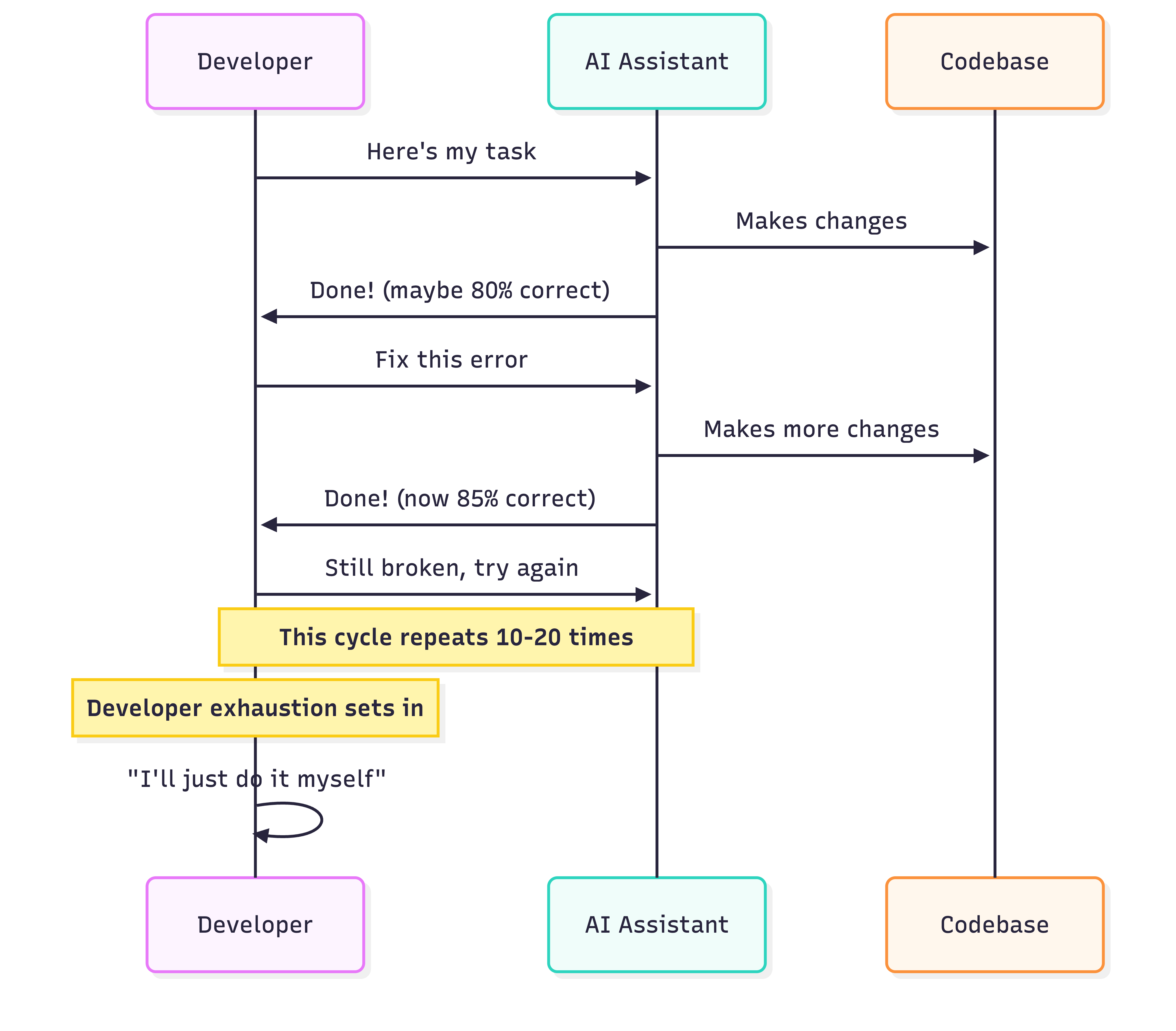
The problem isn’t the AI’s capability. It’s the workflow. Every single iteration requires human review, approval, and re-prompting. This creates what Huntley calls the “human-in-the-loop bottleneck.”
You’re not coding anymore. You’re babysitting.
The Ralph Revolution: How It Actually Works
The Ralph Wiggum technique flips this entire model on its head. Instead of you managing the AI, the AI manages itself.
Here’s the beautiful part: progress lives in your files and git history, not in the AI’s memory.
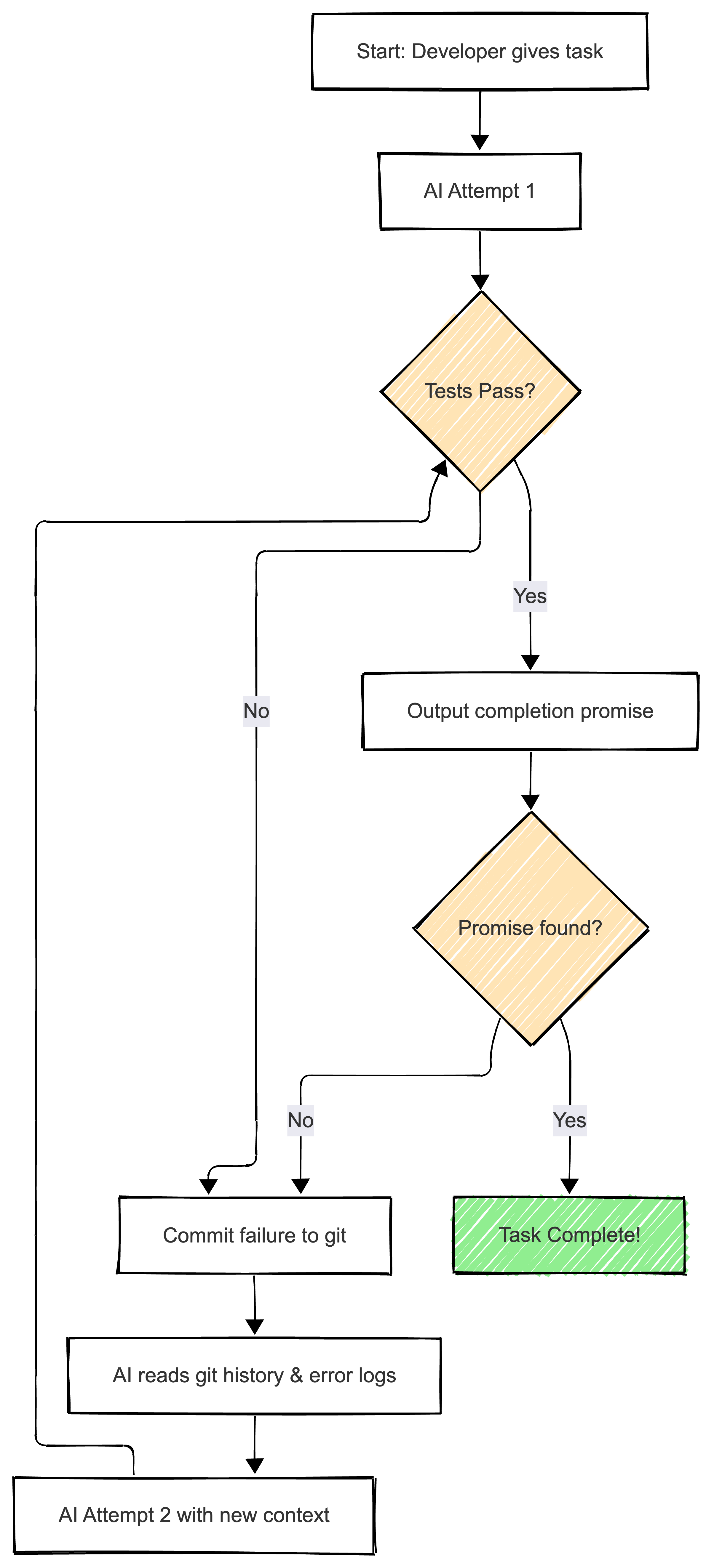
When the AI’s context window fills up, it doesn’t panic. It gets a fresh start, reads what it did previously from git, and continues from there. Each iteration is like handing the baton to a fresh runner who just read the race notes.
The Two Flavors: Bash Loop vs Official Plugin
Original Ralph (The Bash Loop)
Geoffrey Huntley’s original implementation was pure chaos in the best way possible:
#!/bin/bash
# The OG Ralph - brutally simple

while true; do
  echo "Ralph is working..."
  claude-code < PROMPT.md

  # Check if completion promise exists
  if grep -q "COMPLETE" output.log; then
    echo "Ralph is done!"
    break
  fi

  sleep 5  # Brief pause before next iteration
done
This version embodied “naive persistence.” The AI confronted its own mess head-on. No sanitization. No safety nets. Just raw, unfiltered feedback loops that forced the model to escape its own failures.
Official Ralph (The Anthropic Plugin)
By late 2025, Anthropic formalized Ralph into an official Claude Code plugin. The implementation is more sophisticated but maintains the core philosophy:
# Install the plugin
/plugin install ralph-wiggum@claude-plugins-official

# Run a Ralph loop
/ralph-loop "Migrate all tests from Jest to Vitest.
Success criteria:
- All tests pass
- No TypeScript errors
- README updated
Output <promise>COMPLETE</promise> when done." \
--max-iterations 50 \
--completion-promise "COMPLETE"
The official version uses a “Stop Hook” that intercepts Claude’s exit attempts:
- You give Claude a task with clear completion criteria
- Claude works on it and tries to exit when done
- The hook intercepts the exit and checks for your completion promise
- If promise not found, it feeds the same prompt back
- Claude sees its previous work through git history and modified files
- Repeat until done or max iterations reached
Real-World Success Stories That Sound Too Good To Be True
The $50,000 Contract for $297
A developer taught about Ralph by Huntley took on a $50,000 contract. Using autonomous Ralph loops, they delivered a complete MVP, tested and reviewed, for exactly $297 in API costs.
Return on investment: 16,800%
Six Repositories Overnight
At a Y Combinator hackathon, a team put Ralph to the ultimate stress test. The prompt: build six complete project repositories.
Time elapsed: One night
Human intervention: Zero
Repositories shipped: Six
Working code: Yes
API cost: Under $300
The Three-Month Programming Language
Geoffrey Huntley’s most ambitious Ralph experiment: “Make me a programming language like Golang but with Gen Z slang keywords.”
Ralph ran for three consecutive months. The result was CURSED, a fully functional programming language featuring:
- Keywords like
slay(function),sus(variable),based(true) - LLVM compilation to native binaries
- A complete standard library
- Partial editor support
- Two execution modes
A programming language created by persistent AI loops with minimal human intervention. Wild.
The Architecture: How To Build Your Own Ralph System
For those who want to implement Ralph properly, here’s the recommended architecture:

Essential Components
1. Clear Completion Criteria
Your prompt needs to be measurable, not vague:
❌ BAD: "Make the code better"

✅ GOOD: "Refactor authentication module.
Success criteria:
- All existing tests pass
- New tests for edge cases added
- TypeScript strict mode enabled
- No linting errors
- Code coverage >= 85%
Output <promise>REFACTOR_COMPLETE</promise> when done."
2. Automated Verification
Ralph only works if the AI can verify its own work:
// Example verification in your codebase
{
  "scripts": {
    "verify": "npm run test && npm run lint && npm run typecheck"
  }
}
The AI should run verification after every attempt. If verification fails, that failure becomes data for the next iteration.
3. Iteration Limits (Your Safety Net)
Always set maximum iterations to prevent runaway costs:
# Conservative approach for new tasks
/ralph-loop "Your task" --max-iterations 10

# Tested tasks can go higher
/ralph-loop "Your task" --max-iterations 50

# Never start above 50 without testing first
4. Git as Memory
Every iteration should create git commits. The AI reads git history to understand what was tried before:
git log --oneline
# a3f2c4 Ralph iteration 5: Fix TypeScript errors
# 8d1e9a Ralph iteration 4: Add missing tests
# c7b3f2 Ralph iteration 3: Update dependencies
Practical Use Cases: When Ralph Shines
Ralph isn’t magic. It’s a power tool for specific jobs. Here are scenarios where it excels:
1. Large-Scale Refactoring
/ralph-loop "Migrate entire codebase from React 16 to React 19.
Success criteria:
- All components updated
- All tests pass
- No deprecated API usage
- Performance metrics unchanged
Output <promise>MIGRATION_COMPLETE</promise> when done." \
--max-iterations 30
Why it works: Clear success metrics, automated tests verify correctness
2. Test Coverage Expansion
/ralph-loop "Add unit tests for all functions in src/utils.
Success criteria:
- Coverage >= 85%
- All tests pass
- No lint errors
Output <promise>TESTS_COMPLETE</promise> when done." \
--max-iterations 20
Why it works: Coverage is measurable, tests verify themselves
3. Documentation Generation
/ralph-loop "Generate comprehensive API documentation.
Success criteria:
- JSDoc for all public functions
- README with examples
- Markdown lint passes
- No broken links
Output <promise>DOCS_COMPLETE</promise> when done." \
--max-iterations 15
Why it works: Documentation quality is checkable, clear deliverables
4. Dependency Upgrades
/ralph-loop "Upgrade all dependencies to latest stable versions.
Success criteria:
- package.json updated
- All tests pass
- Build succeeds
- No security vulnerabilities
Output <promise>UPGRADE_COMPLETE</promise> when done." \
--max-iterations 25
Why it works: Tests verify nothing broke, security scans are automated
When NOT To Use Ralph
Ralph has limitations. Don’t use it for:
Tasks Requiring Judgment
- Architecture decisions
- UX design choices
- Business logic that needs domain expertise
- Security-critical code that needs manual audit
Vague Requirements
- ”Make it better"
- "Add some features"
- "Improve performance” (without metrics)
Complex Codebases Without Tests
If you don’t have automated tests, Ralph can’t verify success. You’ll end up with code that “looks done” but might be broken.
The Hidden Costs (What They Don’t Tell You)
Let’s talk about money because this is where developers get burned.
Token Consumption Reality
A single Ralph iteration on a large codebase:
- Context window: ~50,000 tokens
- Output: ~10,000 tokens
- Cost per iteration: ~$1-2
For 50 iterations: $50-100 in API costs
The Math That Makes It Worth It
Developer time saved:
- 8 hours of manual refactoring = $400-800 (at $50-100/hour)
- Ralph cost = $50-100
- Net savings = $300-700
But only if it works. Failed attempts still cost money.
Cost Control Strategies
# Start small to test
/ralph-loop "Small, isolated task" --max-iterations 5

# Monitor your API dashboard
# Set spending alerts

# Use test-driven development
# Tests catch failures early, preventing wasted iterations
The Community Explosion
Ralph went from a GitHub gist to a viral phenomenon in months. Here’s the ecosystem that emerged:
Community Forks & Tools
- Intelligent exit detection
- Rate limiting (100 calls/hour)
- Circuit breaker to prevent runaway loops
- Dashboard monitoring
- 145 tests, 100% pass rate
- AI SDK integration
- Streaming support
- Custom verification functions
- Cost tracking
The Meme Economy
Someone even launched $RALPH, a Solana memecoin celebrating the technique. It surged 20% after launch and funds community projects around autonomous coding.
Geoffrey Huntley himself clarified he didn’t create the token, but the community’s enthusiasm speaks volumes about Ralph’s cultural impact.
Expert Takes: What The Pros Are Saying
Matt Pocock (TypeScript educator with massive following):
“One of the dreams of coding agents is that you can wake up in the morning to working code. Ralph is the closest I’ve seen to this dream. It’s a vast improvement over any other AI coding orchestration setup I’ve tried.”
His viral breakdown emphasized: “How it started: Swarms, multi-agent orchestrators, complex frameworks. How it’s going: Ralph Wiggum.”
Wes Winder (Developer):
“Opus 4.5 with Ralph Wiggum and Playwright is AGI”
(Note: It’s not actually AGI, but the enthusiasm is real)
Dexter Horthy (HumanLayer CEO): Hosted a deep dive with Huntley discussing the philosophy difference between the original bash loop and the official plugin. The key insight: the original’s power came from “unsanitized feedback” forcing the model to confront its mess.
Getting Started: Your First Ralph Loop
Ready to try it? Here’s a step-by-step beginner’s guide:
Step 1: Install Claude Code & Plugin
# Install Claude Code (if not already installed)
# Then add the official plugin marketplace
/plugin marketplace add anthropics/claude-plugins-official

# Install Ralph Wiggum plugin
/plugin install ralph-wiggum
Step 2: Pick A Simple, Measurable Task
Don’t start with “build me an app.” Start with something boring and well-defined:
# Example: Add type annotations to one file
/ralph-loop "Add TypeScript type annotations to src/utils/helpers.ts.
Success criteria:
- All functions have explicit return types
- All parameters have types
- No 'any' types used
- TypeScript strict mode passes
Output <promise>TYPES_COMPLETE</promise> when done." \
--max-iterations 10
Step 3: Watch What Happens (Don’t Intervene!)
This is the hardest part for developers: resist the urge to help. Let Ralph work through failures. Each failure is data.
Step 4: Review The Results
Once complete, review the git history:
git log --oneline -10
git diff HEAD~10..HEAD
You’ll see every iteration’s progress. It’s educational to watch Ralph’s thought process.
Step 5: Scale Up Gradually
Once you trust the pattern:
# Overnight task example
/ralph-loop "Complete migration of all component tests to Vitest.
Success criteria:
- All test files migrated
- All tests pass
- Coverage maintained or improved
- CI/CD pipeline green
Output <promise>MIGRATION_COMPLETE</promise> when done." \
--max-iterations 40
Set an API spending alert first.
Advanced Patterns: Ralph for Power Users
Pattern 1: Multi-Stage Ralph
Break large tasks into sequential Ralph loops:
# Stage 1: Refactor
/ralph-loop "Refactor auth module" --max-iterations 20

# Stage 2: Test (only after Stage 1 completes)
/ralph-loop "Add comprehensive tests to auth module" --max-iterations 15

# Stage 3: Document
/ralph-loop "Generate API documentation for auth module" --max-iterations 10
Pattern 2: Ralph + Monitoring
Use community forks with built-in monitoring:
# With frankbria/ralph-claude-code
ralph --monitor  # Opens dashboard showing progress, costs, iterations
Pattern 3: Completion Promises as Contracts
Design your completion promise to enforce quality:
Output the following ONLY when ALL criteria met:
<promise>
VERIFIED:
- Tests: [number] passed
- Coverage: [percentage]%
- Lint: Clean
- Build: Success
COMPLETE
</promise>
The Philosophical Shift: From Perfection to Iteration
Ralph represents a fundamental mindset change in AI-assisted development:
Old Mindset (Waterfall AI)
Perfect prompt → Perfect code → Done
This rarely works. You spend hours crafting the perfect prompt, get 80% of what you wanted, then manually fix the rest.
New Mindset (Agile AI)
Clear goal → Iterate → Verify → Repeat until done
This mirrors how humans actually code. We don’t write perfect code on the first try. We iterate, test, refactor, and improve.
The key insight: AI agents are probabilistic. They don’t make the same decision twice. So instead of trying to force deterministic behavior, we embrace the chaos and let iteration find the solution.
Common Pitfalls & How To Avoid Them
Pitfall 1: Vague Completion Criteria
Problem: “Improve the code quality”
Solution: “Refactor with these specific metrics:
- Cyclomatic complexity < 10 per function
- No functions > 50 lines
- Test coverage >= 85%
- All linting rules pass”
Pitfall 2: No Automated Verification
Problem: Ralph keeps declaring success on broken code
Solution: Add verification scripts:
{
  "scripts": {
    "verify": "npm run test && npm run lint && npm run build"
  }
}
Make running verification part of your completion criteria.
Pitfall 3: Context Pollution
After many iterations, the context gets messy. Ralph solves this by using git as memory, but you can help:
# Clear temporary files between iterations
# Keep only essential context
# Let git history be the source of truth
Pitfall 4: Runaway Costs
Problem: Forgot to set max iterations, woke up to a $500 API bill
Solution:
- ALWAYS set —max-iterations
- Set API spending alerts
- Start with low iteration limits (5-10) for new tasks
- Only increase after testing
Integration With Modern Development Workflows
Ralph isn’t isolated. It integrates with your existing tools:
With Cursor
# Cursor's implementation
curl -fsSL https://raw.githubusercontent.com/agrimsingh/ralph-wiggum-cursor/main/install.sh | bash
With Aider
Aider’s watch mode + auto-commit creates a Ralph-like experience:
aider --watch --auto-commits
With CI/CD
Ralph can run in your CI pipeline for automated maintenance:
# GitHub Actions example
name: Ralph Maintenance
on:
  schedule:
    - cron: '0 0 * * 0'  # Weekly
jobs:
  ralph-updates:
    runs-on: ubuntu-latest
    steps:
      - uses: actions/checkout@v2
      - name: Run Ralph
        run: |
          /ralph-loop "Update dependencies and fix tests" \
            --max-iterations 30
The Future: What’s Next For Ralph?
As Claude Opus 4.5 and future models improve, Ralph might become less necessary for simple tasks. Better context management means fewer iterations needed.
But Ralph’s core insight remains valuable: iteration beats perfection when you have clear goals and automated verification.
We’re likely to see:
- Better integration with popular IDEs
- Smarter iteration strategies (when to reset context, when to persist)
- Cost optimization (detecting when iterations aren’t making progress)
- Multi-agent Ralph (multiple AIs working on different parts)
Key Takeaways For Different Audiences
For Beginners
- Ralph is a loop that keeps trying until success
- Works best with clear goals and automated tests
- Start small, scale gradually
- Always set iteration limits
For Intermediate Developers
- Ralph shifts skill from “directing AI” to “defining success”
- Git becomes your memory layer
- Failures are data, not problems
- Cost management is critical
For Advanced/Architects
- Ralph represents eventual consistency for AI systems
- Trade compute cost for developer time
- Works best for well-defined, mechanical tasks
- Not a replacement for human judgment
For Non-Technical/Executives
- Ralph turns $50,000 projects into $300 API costs
- Enables “overnight development” (set it, forget it)
- Best for maintenance, refactoring, testing
- Reduces developer burnout from tedious tasks
Resources & Further Learning
Official Documentation
- Claude Code Plugin: Available via
/plugin install ralph-wiggum - Original Philosophy: Geoffrey Huntley’s Blog
- Anthropic Docs: Check Claude Code documentation for latest updates
Community Resources
- GitHub Implementations: frankbria/ralph-claude-code, vercel-labs/ralph-loop-agent
- Video Tutorials: Matt Pocock’s viral breakdown (search “Matt Pocock Ralph Wiggum”)
- Deep Dive: HumanLayer’s “Brief History of Ralph” blog
Key Figures To Follow
- Geoffrey Huntley (@GeoffreyHuntley) - Creator, original philosopher
- Matt Pocock (@mattpocockuk) - Educator, clear explanations
- Dexter Horthy - HumanLayer CEO, deep technical analysis
Downloadable Resources: Your Ralph Starter Kit
To help you implement Ralph effectively, I’ve created a complete set of production-ready templates, checklists, and documentation. Think of this as your Ralph SDLC starter kit.
Available Templates
All templates are available in the templates section of this site:
- Ralph Task Definition Guide - How to write Ralph-ready task definitions with measurable success criteria
- Ralph Pre-Launch Checklist - Comprehensive checklist to ensure success before every Ralph run
- Ralph Product Requirements Document - Complete PRD for implementing Ralph workflows in your organization
- Ralph Implementation Skill Guide - Step-by-step guide to mastering autonomous AI coding
Each template is production-ready and can be adapted to your specific projects. They help you avoid common pitfalls and implement Ralph effectively from day one.
Key Document: Task Definition Guide
The Task Definition Guide is critical for writing Ralph-ready task definitions. It includes:
- Task definition templates
- Success criteria frameworks
- Verification command patterns
- Completion promise examples
- Cost estimation guidelines
- Troubleshooting guides
Essential Checklist: Pre-Ralph Launch
The Pre-Launch Checklist ensures you’ve covered all bases before running Ralph:
- Environment setup verification
- Task definition quality review
- Verification system testing
- Cost controls and safety nets
- Recovery plans
Use this checklist before every Ralph run to prevent costly mistakes and ensure success.
Final Thought: The Beauty of Simple Solutions
The AI industry spent 2025 building elaborate multi-agent swarms, complex orchestration frameworks, and sophisticated architectures. Then a guy raising goats in Australia wrote a five-line bash loop and changed everything.
Ralph Wiggum teaches us that sometimes the dumbest approach is the smartest solution. Naive persistence beats sophisticated complexity when you have clear goals and good feedback loops.
As Matt Pocock put it: “How it started: Swarms, multi-agent orchestrators, complex frameworks. How it’s going: Ralph Wiggum.”
There’s something almost embarrassing about how simple it is. And that’s exactly why it works.
Remember: Better to fail predictably than succeed unpredictably.
Now go forth and let Ralph help you ship code while you sleep.
Read time: 7 minutes
Iteration beats perfection when you know what done looks like.
Citations & References
-
VentureBeat - How Ralph Wiggum went from ‘The Simpsons’ to the biggest name in AI right now
-
DEV Community - 2026: The Year of the Ralph Loop Agent
-
Medium - Ralph Wiggum Explained: The Claude Code Loop That Keeps Going
-
Webcoda - The Ralph Wiggum Technique: Ship Code While You Sleep
-
GitHub - Vercel Labs Ralph Loop Agent
-
Paddo.dev - Ralph Wiggum: Autonomous Loops for Claude Code
-
HumanLayer - A Brief History of Ralph
-
Geoffrey Huntley’s Blog - Ralph Wiggum as a “Software Engineer”
-
GitHub - frankbria/ralph-claude-code
-
Sid Bharath - Ralph Wiggum: The Dumbest Smart Way to Run Coding Agents
Views expressed are my own and do not represent my employer. External links open in a new tab and are not my responsibility.

Discussion
Have thoughts or questions? Join the discussion on GitHub. View all discussions