
OpenClaw for Builders: Architecture, Data Flow, and Security Guardrails
A practical OpenClaw guide for beginner to advanced builders. Learn the gateway architecture, message-to-action data flow, and the security controls that matter before real deployment.
OpenClaw is no longer a niche toy for agent experiments. It is now an ecosystem of self-hosted runtimes, managed wrappers, skill marketplaces, and quick-launch templates.
That growth created two parallel realities:
- Adoption is real and accelerating.
- Security debt is accumulating at the same speed.
I have reviewed the architecture docs, setup paths, and recent security reporting. This post is the practical model I would use before connecting OpenClaw to any meaningful account, API, or system.
OpenClaw is a privileged automation runtime. Treat it like infrastructure, not a chatbot plugin.
For local install, Telegram/WhatsApp connection steps, and hosting options, go to OpenClaw Setup Paths: Local, VPS, Railway, DigitalOcean.
What Changed in 2026
OpenClaw went through rapid identity and distribution changes, from Clawdbot to Moltbot to OpenClaw. At the same time, a wrapper economy appeared around it with many managed hosting offers.
That tells us demand is strong, but it also creates confusion for users:
- Which deployment model is safe?
- Where does data live?
- How do you migrate out later?
- Who is accountable when skills are malicious?
If you skip those questions, you get convenience up front and risk later.
What OpenClaw Actually Is
At a systems level, OpenClaw is a Gateway plus agent runtime that connects:
- chat channels
- models
- tools
- skills
- memory
- control UI
The key point is capability, not conversation. A message can become an action path that touches local files, shell commands, browser flows, and APIs.
This is why OpenClaw must be evaluated as an operator surface.
Architecture one should understand
Use this mental model when debugging and hardening.
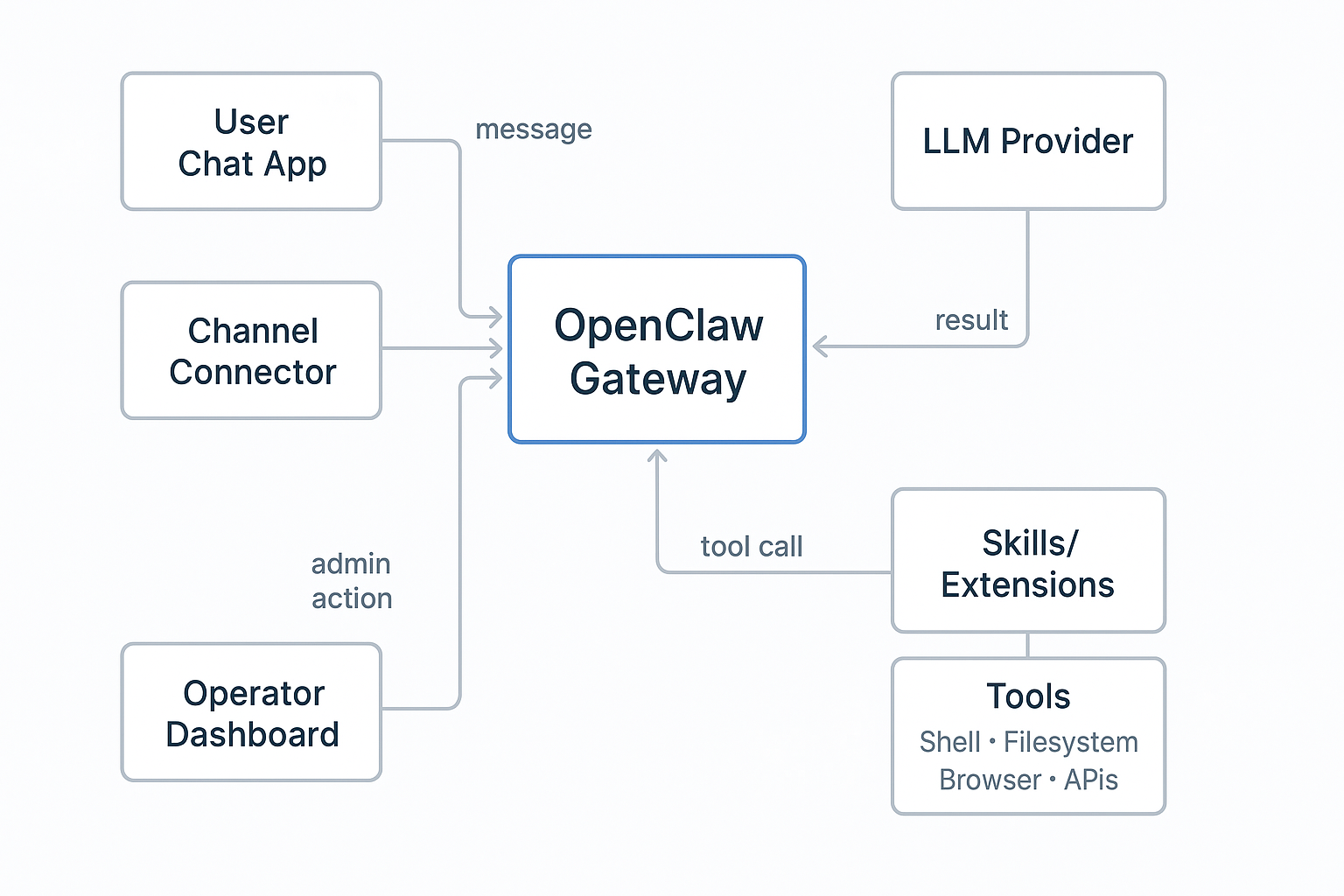
Core roles
- Gateway: orchestration and control plane
- Channel connectors: input and output paths
- Model adapter: reasoning and action planning
- Tool executor: action layer
- Skills: extension layer
- Dashboard: admin and operational control
If a single node in that chain is weak, the whole system is weak.
Data Flow You Should Debug First
Most production issues can be mapped to this loop:
- Message enters from a channel.
- Gateway resolves context and memory.
- Model generates response plan.
- Plan invokes zero or more tools.
- Tool outputs return to gateway.
- Final response is sent back to channel.
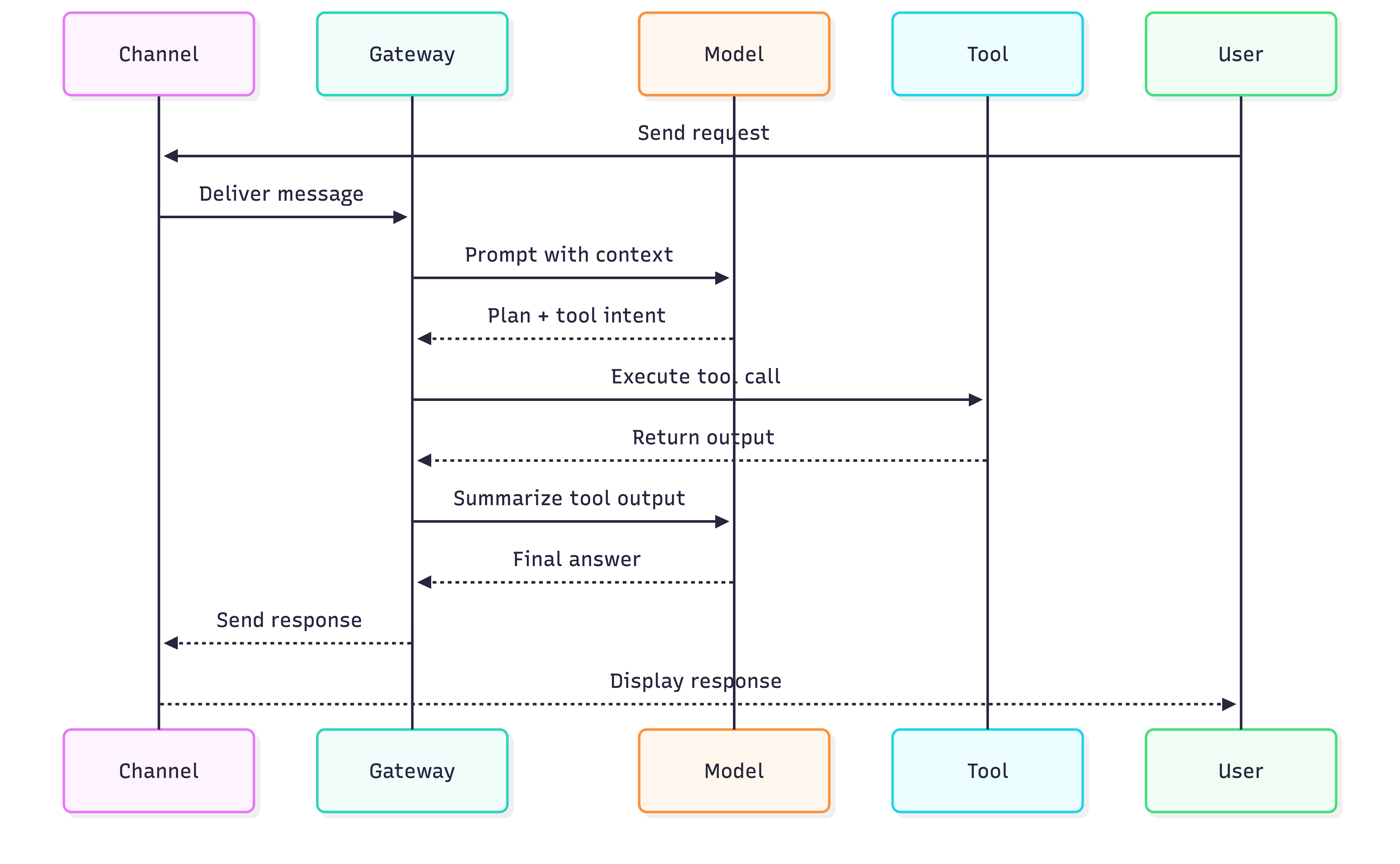
When responses are wrong, look at prompt and context. When behavior is dangerous, inspect tool invocation and policy checks.
What You Can Actually Achieve
If you deploy OpenClaw with guardrails, you can use it as a private operator for real daily work.
Practical outcomes most readers care about:
- run personal and team workflows from chat without opening ten tools
- automate repetitive development tasks such as release notes, PR triage, changelog drafts, and log summarization
- build private workflows for notes, research, and document processing on your own machine or controlled VPS
- connect your own model keys and keep prompt and response handling under your control
- move from “assistant that replies” to “assistant that executes bounded actions”
Typical use cases by role
- Student or beginner builder: study plans, learning reminders, note summarization, project checklists
- Developer: issue triage, build failure summaries, dependency update watchlists, doc-to-task conversion
- Operator or founder: inbox routines, status digests, customer FAQ drafts, meeting follow-ups
Pros and Cons: Private LLM + OpenClaw Runtime
Use this as a decision sheet before you commit to self-hosting.
| Area | Pros | Cons |
|---|---|---|
| Privacy and data control | You control infra, keys, logs, and retention policy. | You are responsible for data handling mistakes and incident response. |
| Automation depth | Can run tool-driven workflows, not only chat responses. | More capability means bigger blast radius if a skill or prompt is malicious. |
| Development productivity | Good for repetitive engineering workflows and internal helper agents. | Needs disciplined tooling boundaries and command policies to stay safe. |
| Cost model | Can be cheaper at moderate usage with BYOK and simple infra. | Hidden cost shows up as ops time, hardening work, and maintenance. |
| Flexibility | You can choose providers, switch models, and customize skills. | Ecosystem quality varies; unmanaged skill installs are a major risk. |
| Portability | Self-hosted path can avoid third-party lock-in. | Managed wrappers may block exports or make migration painful. |
Private LLM Reality Check
Private does not automatically mean secure. Private means you can enforce security decisions, but only if you actually do it.
What private setup helps with:
- reduced third-party data exposure
- clearer control over logs and retention
- easier alignment with internal privacy expectations
What private setup does not solve by default:
- prompt injection through untrusted inputs
- unsafe tool execution
- weak credentials and over-scoped tokens
- compromised or malicious third-party skills
If privacy is your primary goal, pair private hosting with strict execution limits. If automation is your primary goal, pair tool power with explicit policy gates.
The Security Signals Are Not Theoretical
The reporting trend is clear:
- large numbers of exposed instances due to insecure networking defaults and misconfiguration
- skill marketplace abuse, including malicious uploads and credential theft patterns
- warnings from security teams and policy bodies that agent systems need stronger identity and access controls
The exact numbers may keep changing, but the pattern is stable. Fast deployment without strong controls leads to exposed control planes and exploitable extensions.
If your agent can read files and run commands, an unsafe skill is equivalent to running unknown code on your machine.
Threat Model for OpenClaw Operators
Use four threat buckets.
1. Network exposure
- Public dashboard
- weak auth token handling
- no private access layer
2. Skill supply chain
- malicious skill code
- fake tool wrappers
- social engineering through install prompts
3. Prompt and context injection
- untrusted instructions in retrieved content
- hidden action directives that cross into tool execution
4. Privilege blast radius
- broad file access
- unrestricted shell
- browser session access
- over-scoped API keys
If you protect only one area, attackers use the others.
Wrapper Boom: What It Means for Users
Managed wrappers are everywhere because they reduce friction. That is useful for onboarding, but it introduces operator questions:
- Can you export conversation history?
- Can you migrate memory and configs?
- Are backups encrypted and portable?
- Who controls and rotates your secrets?
- What is your exit path?
The wrapper model is not bad by default. The bad pattern is using one without portability and security transparency.
Wrapper Due Diligence Checklist
Before paying for managed OpenClaw hosting, ask for:
- data export format and frequency
- full config export support
- secret storage and rotation model
- clear incident response policy
- region and compliance details
- account deletion guarantees
If answers are vague, assume lock-in risk is high.
Practical Setup Path
If you are new, start with constrained scope.
Phase 1: local baseline
- loopback only
- dashboard on trusted device
- no third-party skills
- low-privilege API keys
Phase 2: private remote access
- SSH tunnel or private network overlay
- explicit gateway auth token
- strict host firewall
Phase 3: controlled expansion
- add one tool class at a time
- enable logging before autonomy
- review every skill as code
For a full hosting comparison, use: OpenClaw Setup Paths: Local, VPS, Railway, DigitalOcean
Security Baseline by Experience Level
Beginner
- stay local
- keep secrets outside workspace
- use read-only paths first
Intermediate
- isolate in VM or container
- apply egress controls
- add command allowlists and tool policies
Advanced
- pre-execution policy engine
- process and file sandboxing
- kill-switch and incident drills
Prompt Injection and Tool Safety
Prompt injection becomes high risk when model output can trigger tools.
Minimal defense pattern:
- classify trust level of each input source
- separate untrusted text from tool planning context
- require policy gate for sensitive tool calls
- log blocked actions and review weekly
Teams that apply this pattern move from demo behavior to operational discipline.
What OpenClaw Is Good For Right Now
Strong early use cases:
- low-risk summaries
- personal workflow automation on isolated data
- controlled agent experiments
Weak early use cases:
- financial or identity-critical automation
- broad filesystem automation on shared hosts
- unmanaged skill installation with production credentials
Final Take
OpenClaw is important because it shifts from “answering” to “acting.” That shift is where most teams underestimate risk.
If you run it like a toy, you will hit avoidable incidents. If you run it like infrastructure, it can be one of the most useful automation layers available right now.
Key Takeaways
- OpenClaw should be modeled as an operator runtime.
- Architecture and data-flow clarity reduce both bugs and risk.
- Skill supply chain risk is one of the largest practical threats.
- Wrapper convenience is useful only if portability is preserved.
- Security controls must be in place before capability expansion.
References
- OpenClaw Docs: Overview
- OpenClaw Docs: Gateway Architecture
- OpenClaw Docs: Dashboard / Control UI
- OpenClaw Docs: Network Model
- Tom’s Hardware coverage on malicious skills
- The Verge coverage on ClawHub skill security risk
- Reuters coverage on regulatory warning context
Views expressed are my own and do not represent my employer. External links open in a new tab and are not my responsibility.

Discussion
Have thoughts or questions? Join the discussion on GitHub. View all discussions