
Supply Chain Attacks, Vibe Coding, and Safer Dependency Habits
The March 2026 axios npm compromise and LiteLLM PyPI attack show how package trust breaks. Practical dependency habits that reduce your exposure.
Earlier today, two malicious versions of axios were published to npm. axios has over 100 million weekly downloads. The attacker hijacked the primary maintainer’s account, published backdoored releases across both the 1.x and 0.x branches, and pre-staged a typosquatted dependency to deliver a remote access trojan. npm removed both versions within three hours. If you ran npm install or npm update in a project using axios between approximately 12:00 and 15:00 UTC today, check your environment immediately.
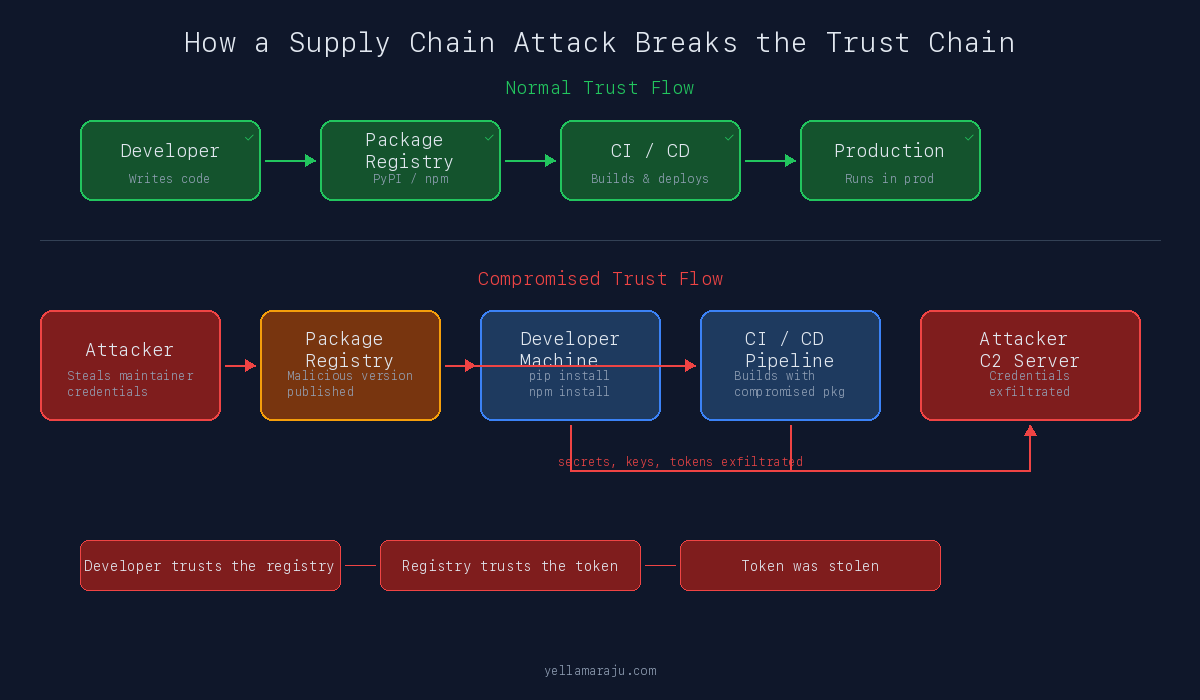
Modern supply chain attacks do not start with your code. They start with your trust.
This morning, malicious versions of axios appeared on npm. Last week, two poisoned releases of litellm landed on PyPI. Both were legitimate, widely used packages hijacked through stolen credentials. Both exploited the same assumption: that the package you installed yesterday is the same package you install today.
In March 2026, that assumption failed repeatedly, across two of the largest package ecosystems, as part of the same coordinated campaign.
AI-assisted coding did not invent supply chain risk. But it compresses the time between idea and npm install. It does not compress the time needed to decide whether a dependency is safe.
Why This Is Getting Worse
Package ecosystems are deeply interconnected. A single compromise can move across ecosystems, release pipelines, and CI systems within days.
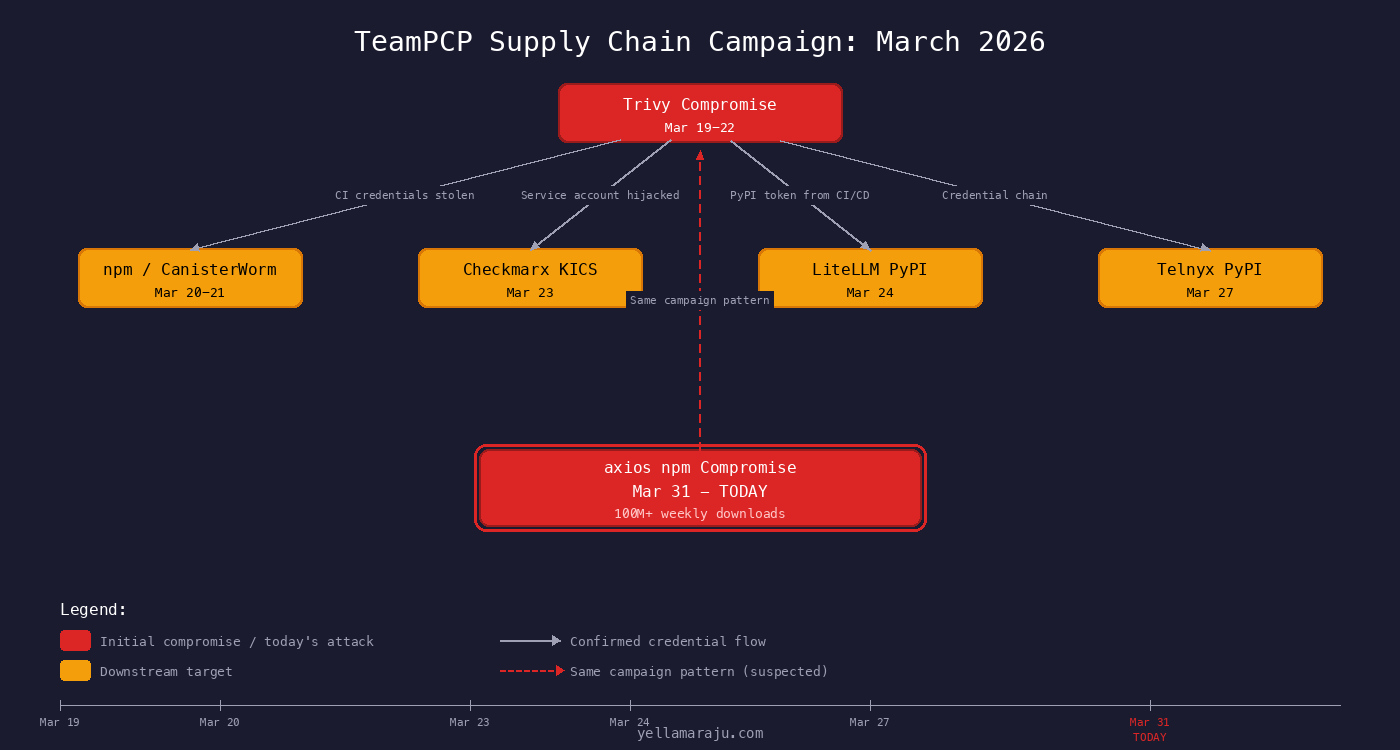
In March 2026, a threat actor group known as TeamPCP demonstrated exactly this. They compromised Aqua Security’s Trivy project on March 19, used stolen credentials from that breach to poison downstream targets, and within 12 days had touched GitHub Actions, Docker Hub, npm, PyPI, and OpenVSX [1].
The cascade looked like this:
Transitive dependencies make developers trust code they never reviewed directly. A project that depends on LiteLLM does not choose every package LiteLLM depends on. But when LiteLLM gets compromised, every downstream project inherits that compromise.
AI-generated setup flows make adoption faster than evaluation. When a model suggests pip install litellm as part of a working code sample, it does not pause to ask whether version 1.82.8 was published by the real maintainer.
Trust boundaries are no longer isolated. The same campaign moved from security tools to npm to PyPI within days.
What a Supply Chain Attack Actually Is
A supply chain attack in software is when an attacker compromises a component in the chain between a package author and the developer who installs it. The attacker injects malicious code into an otherwise normal installation and update flow. Victims get compromised by doing standard work: running npm install, executing CI builds, or upgrading package versions.
There are important differences between the ways this happens:
| Type | What It Means | Example |
|---|---|---|
| Vulnerable package | Legitimate package with an unintentional security bug | A library with an unpatched CVE |
| Malicious package | Package created from scratch to harm users | A fake package with a name close to a popular one |
| Compromised legitimate package | Real, trusted package hijacked by an attacker | LiteLLM 1.82.7 and 1.82.8 |
| Typosquat | Package with a name deliberately similar to a popular one | plain-crypto-js impersonating crypto-js |
The March 2026 incidents included both compromised legitimate packages and typosquats working together. That combination is what made them so effective.
The LiteLLM PyPI Compromise
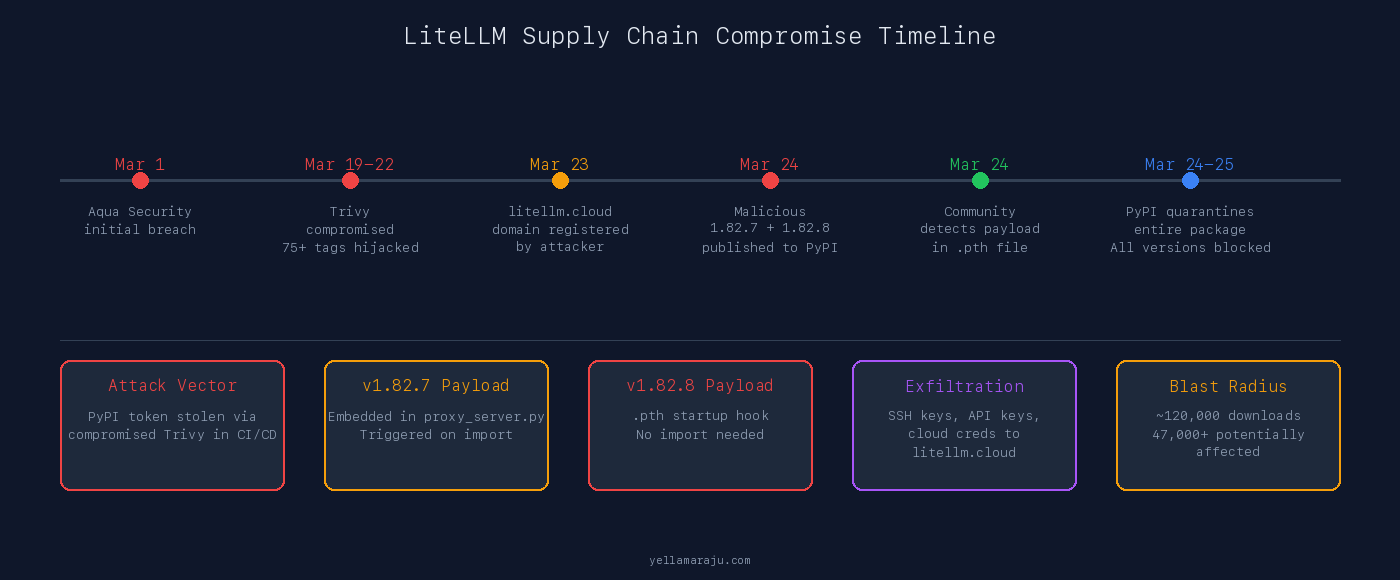
On March 24, 2026, attackers published two malicious versions of litellm to PyPI: versions 1.82.7 and 1.82.8. Neither version existed in the LiteLLM GitHub repository. There were no matching tags, no matching commits, no matching CI builds. The attacker published directly to PyPI using a stolen maintainer token [2][3].
This was not “Python is insecure.” This was a registry and package trust failure affecting a legitimate, widely used package with over 120,000 downloads of the compromised versions [1].
How It Happened
The attack chain traced back to the Trivy compromise. LiteLLM’s CI pipeline used Trivy for security scanning, installed via apt without version pinning. When Trivy was compromised by TeamPCP, a CI run during the compromise window pulled the poisoned Trivy binary. That binary exfiltrated CI secrets, including the PyPI publishing token for the krrishdholakia maintainer account [2][4].
With that token, the attacker published two malicious versions that looked like normal patch releases.
What the Two Versions Did Differently
Version 1.82.7 embedded the payload inside litellm/proxy/proxy_server.py. It activated when you ran import litellm.proxy. If you installed the package but never imported proxy code, the payload did not trigger [2].
Version 1.82.8 escalated. It added a file called litellm_init.pth to the package. .pth files in Python’s site-packages directory execute automatically when the Python interpreter starts. No import needed. No code execution needed. Just starting Python was enough [3].
.pth files are processed by Python’s site module on every interpreter startup. A malicious .pth file runs before your code, before your tests, before your linter. If litellm==1.82.8 was installed in your environment, the payload executed every time Python started.
What the Payload Did
The credential stealer collected SSH keys, environment variables (including API keys and secrets), AWS, GCP, Azure, and Kubernetes credentials, crypto wallet data, database passwords, SSL private keys, shell history, and CI/CD configuration files [3].
It encrypted the collected data with AES-256-CBC and a randomly generated session key, encrypted that session key with a hardcoded RSA-4096 public key, packed everything into an archive, and exfiltrated it via HTTPS POST to models.litellm.cloud. That domain was registered on March 23, 2026, one day before the malicious packages appeared [2][3].
Key Signals That Something Was Wrong
- Versions 1.82.7 and 1.82.8 appeared on PyPI with no corresponding GitHub tags or releases
- The last legitimate CI-published version was 1.82.6 from March 22
- The
.pthfile was a completely abnormal artifact for this package - The exfiltration domain
litellm.cloudwas not the officiallitellm.ai - The maintainer’s GitHub account showed hundreds of spam commits, indicating account compromise
The axios npm Compromise - Today
This happened hours ago. Two malicious versions of axios appeared on npm this morning: 1.14.1 and 0.30.4. axios is the most popular JavaScript HTTP client library, with over 100 million weekly downloads. The scale of potential exposure is enormous: any project that ran npm install or npm update with a floating version range on axios during the three-hour window could have pulled the compromised release.
The attacker compromised the jasonsaayman npm account (the primary maintainer), changed the account email to an attacker-controlled ifstap@proton.me address, and published malicious builds across both the 1.x and 0.x release branches simultaneously [5][6]. Publishing across two major version branches at once was deliberate. It maximized the chance of hitting projects regardless of which axios generation they depended on.
The Attack Was Pre-Staged
Eighteen hours before the malicious axios versions appeared, the attacker created a package called plain-crypto-js from an account using nrwise@proton.me. Version 4.2.0 was published first as a clean decoy containing a copy of the legitimate crypto-js source. Its only purpose was to establish npm publishing history so the package would not trigger “brand-new account” alarms [5].
Then version 4.2.1 landed with the malicious payload: a postinstall hook running node setup.js, an obfuscated RAT dropper targeting macOS, Windows, and Linux [5].
What Made the Malicious Releases Detectable
Every legitimate axios 1.x release was published via GitHub Actions using npm’s OIDC Trusted Publisher mechanism. The publish is cryptographically tied to a verified GitHub Actions workflow. axios@1.14.1 broke that pattern entirely. It was published manually via a stolen npm access token with no OIDC binding and no gitHead [5].
// axios@1.14.0 (legitimate)
"_npmUser": {
  "name": "GitHub Actions",
  "email": "npm-oidc-no-reply@github.com",
  "trustedPublisher": { "id": "github" }
}

// axios@1.14.1 (malicious)
"_npmUser": {
  "name": "jasonsaayman",
  "email": "ifstap@proton.me"
  // no trustedPublisher, no gitHead
}
There was no commit or tag in the axios GitHub repository that corresponded to 1.14.1. The version existed only on npm [5].
The Payload
The malicious axios versions added plain-crypto-js@^4.2.1 as a runtime dependency. This package was never imported anywhere in the axios source. It existed solely to trigger the postinstall hook [5].
The dropper (setup.js) used a two-layer obfuscation scheme. Once decoded, it:
- Detected the operating system
- Downloaded a platform-specific RAT from a command-and-control server at
sfrclak.com:8000 - Launched the RAT in the background, detached from the npm process tree
- Deleted itself and replaced the malicious
package.jsonwith a clean stub reporting version 4.2.0
That last step was deliberate anti-forensics. After infection, npm list would show plain-crypto-js@4.2.0, not the malicious 4.2.1 that actually ran [5].
The dropper replaced its own package.json after execution. A post-incident check of node_modules would show a clean manifest. The only reliable indicator was the existence of the node_modules/plain-crypto-js/ directory itself, since that package was never a dependency of any legitimate axios version.
npm unpublished both malicious versions within approximately three hours. axios@1.14.1 was live for about 2 hours 53 minutes. axios@0.30.4 was live for about 2 hours 15 minutes [5].
If You Installed axios Today
If you ran npm install, npm update, or npm ci in a project that depends on axios between approximately 12:00 and 15:00 UTC on March 31, 2026, take these steps:
- Check your lockfile. If
package-lock.jsonoryarn.lockreferencesaxios@1.14.1oraxios@0.30.4, your environment was exposed. - Check for
node_modules/plain-crypto-js/. This directory should not exist in any legitimate axios installation. Its presence is a confirmed indicator of compromise. - Rotate every credential accessible from that environment. API keys, cloud credentials, SSH keys, CI tokens, database passwords. All of them.
- Check for unexpected background processes. The RAT runs detached from the npm process tree. Look for unfamiliar long-running processes or outbound connections to
sfrclak.com. - Pin axios to
1.14.0or the last known-good version and regenerate your lockfile from clean.
The anti-forensics in this attack mean that a simple npm list will not show the malicious version after infection. The dropper cleaned up after itself. You need to check lockfile history and network logs, not just current package state.
How These Incidents Were Identified
Neither compromise was caught by automated vulnerability scanners. They were identified by humans and specialized detection tools noticing that something did not look right.
Signals That Triggered Detection
Unexpected version publications. Both LiteLLM and axios had versions appear on the registry with no corresponding GitHub tags, commits, or CI builds. For anyone watching the release flow, a version number that exists on the registry but not in the source repository is a red flag.
Publishing path anomalies. axios’s legitimate releases used OIDC Trusted Publishing through GitHub Actions. The malicious releases were published manually. That break in the publishing pattern was a concrete, verifiable detection signal [5].
Abnormal execution behavior. The .pth auto-execution in the LiteLLM case was a strong indicator. .pth files are not a normal artifact for application packages. Defenders recognized that a package suddenly including a .pth file that ran exec(base64.b64decode(...)) was suspicious on sight [3].
Unusual outbound network calls. StepSecurity’s Harden-Runner tool detected the axios dropper making outbound connections to sfrclak.com:8000 during CI runs. That domain had never appeared in any prior workflow run. The connection happened within 2 seconds of npm install [5].
Community response. Researchers correlated campaigns across ecosystems. The teampcp identifier and attack patterns linked the Trivy, LiteLLM, Telnyx, and Checkmarx compromises together [1][4].
What Detection Looked Like in Practice
A new version appears on the registry without a matching GitHub tag or source commit. A developer notices the version number gap, diffs the package tarball against the expected source, and finds code that should not be there.
CI starts making outbound network calls it never made before. A monitoring tool flags a connection to an unknown domain. An incident responder traces it back to a postinstall hook in a newly added dependency.
Python interpreter startup suddenly executes code before normal runtime. The .pth file triggers a subprocess that sends encrypted data to an external server. A security researcher finds the file in site-packages and decodes the base64 payload.
Practical Dependency Habits That Reduce Risk
This is the part that matters for your daily work.
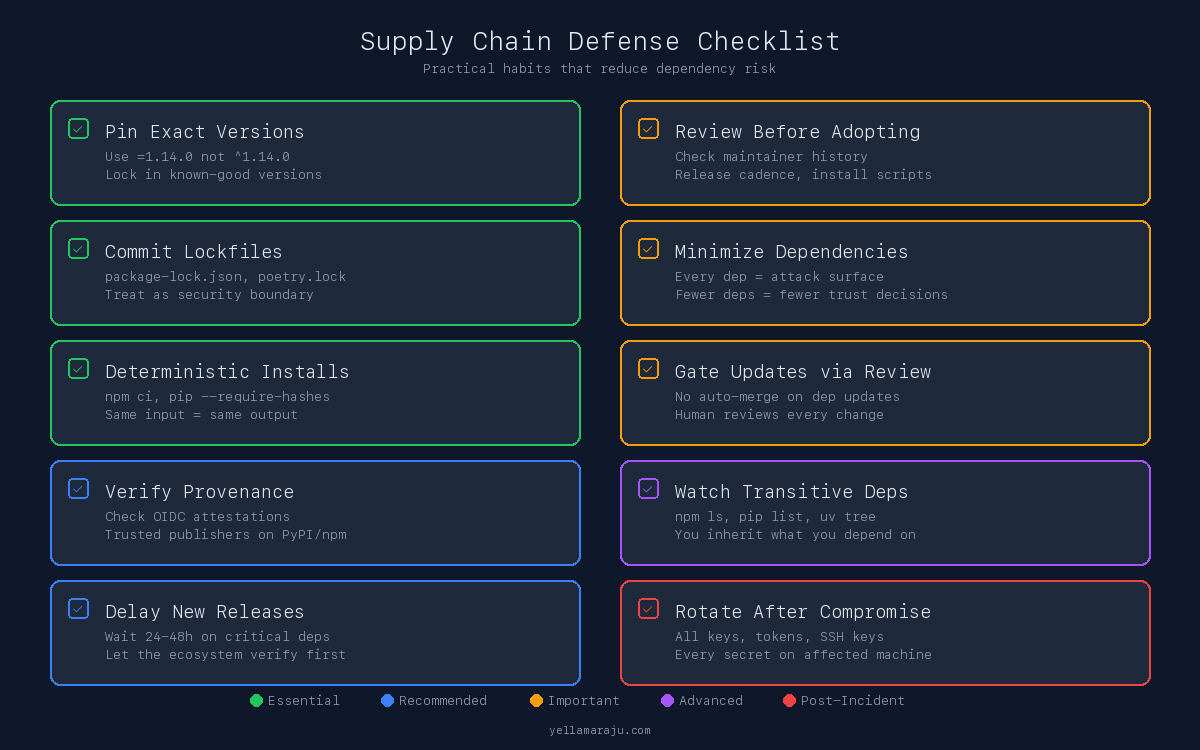
Pin Versions
Use exact version pins for production dependencies. Not ^1.14.0. Not ~1.82.6. The exact version: 1.14.0, 1.82.6.
Floating ranges like ^ and ~ let package managers pull new versions automatically. That is exactly the mechanism these attacks exploit. A compromised patch release lands, and your next npm install pulls it in without you ever choosing it.
Pinning protects you from future surprises. It does not protect you from a bad decision you already committed. If you pin version 1.82.7 and that version is the compromised one, pinning just locks in the compromise. Pin to known-good versions, and verify before blessing a version into your lockfile.
Commit Lockfiles
Lockfiles (package-lock.json, yarn.lock, poetry.lock, uv.lock) record the exact resolved versions of every dependency, including transitive ones. Treat them as part of the security boundary.
If your lockfile is not committed, every developer and every CI run resolves dependencies independently. That means each one can get a different result, and a compromised version can sneak in through one build path while others look clean.
Use Deterministic Install Flows
Run npm ci instead of npm install in CI and production. npm ci installs exactly what the lockfile specifies. npm install will modify the lockfile if newer versions are available.
For Python, prefer exact pins and hash-verified installs in high-trust environments:
# pip with hash verification
pip install --require-hashes -r requirements.txt

# uv with lockfile
uv sync --frozen
Verify Package Provenance
npm now supports provenance attestations that cryptographically link a published package to its source repository and build. The axios case is a textbook example: legitimate releases had OIDC provenance. The malicious ones did not [5].
Check for provenance before trusting a new version of a critical dependency. If a package that previously had provenance suddenly publishes without it, that is a signal worth investigating.
For Python, PyPI supports trusted publishers via OpenID Connect. Projects using trusted publishing bind their releases to specific CI workflows. A release published outside that workflow is suspicious by definition.
Review Before Adopting
Before adding a new dependency, look at:
- Who published it and how long have they been active
- Release cadence and whether it matches the project’s normal rhythm
- Install scripts (
postinstall,.pthfiles,setup.pywith unusual behavior) - Whether the package has more dependencies than it should
- Maintainer history and whether accounts have changed recently
Minimize Dependencies
Every dependency is an attack surface. A package that wraps a single standard library function is not worth the risk. The plain-crypto-js package in the axios attack existed solely to run a postinstall hook. It was never imported. It was never used. Its only purpose was to execute code on install [5].
Fewer dependencies mean fewer trust decisions.
Gate Dependency Updates
Do not auto-merge dependency updates in CI. Tools like Dependabot and Renovate are useful for visibility, but every update should go through review. A compromised patch release looks exactly like a normal patch release to an automated tool.
Delay adoption of brand-new releases, especially for widely depended-on packages. The malicious axios versions were live for less than three hours. If you had a 24-hour delay policy on new releases, you would never have installed them.
Distinguish Dev from Production
Exploratory local installs are higher risk. You are more likely to install packages quickly, skip review, and run arbitrary code. That is fine for experimentation. It is not fine when those packages persist into production.
CI and production installs must be deterministic and locked. No floating ranges. No npm install resolving new versions on the fly. No pip install without a lockfile or hash verification.
Handle Transitive Dependencies
The LiteLLM compromise affected every project that listed LiteLLM as a dependency, including Google’s ADK Python library, MLflow, and Guardrails AI [2]. Those projects did not choose LiteLLM’s compromised version. They inherited it.
Review your dependency tree, not just your direct dependencies. Use npm ls, pip list, or uv tree to understand what you are actually installing.
Rotate Secrets After a Known Compromise
If you installed a compromised package, rotate everything. Every API key, every cloud credential, every SSH key, every CI secret that was accessible on that machine or in that environment. The LiteLLM payload collected everything it could find [3].
AI-Assisted Coding and the Speed Problem
AI-generated code often includes pip install X or npm install Y with little or no explanation of what that package does. Models optimize for working code, not for safe dependencies.
This is not a criticism of AI tools. It is an observation about incentives.
When a model generates a code sample that includes pip install litellm, the developer gets a working example. The model does not check whether the current version on PyPI matches the GitHub source. It does not verify publishing provenance. It does not flag that the latest version was published by a different account than the previous one.
Vibe coding encourages “make it work now” behavior. That often means installing first and verifying never. The dependency decision happens in the time it takes to copy a command from a chat window and paste it into a terminal.
This changes the scale of exposure. Dependency decisions happen faster and with less scrutiny. A developer using AI assistance might add five new packages in an afternoon. Without AI, that same developer might have added one or two, with more time spent reading documentation and evaluating alternatives.
The March 2026 compromises show what happens when that speed meets an attacker who times their malicious release to land during active development hours. The axios compromise went live on a Monday morning - the start of the work week across most of the world. Developers were opening projects, running fresh installs, pulling updates. The three-hour window was enough. If a model suggested npm install axios to anyone during that window, the person who followed that suggestion without checking the version got a remote access trojan [5].
The problem is not using AI. The problem is outsourcing trust decisions to speed.
Closing
Package installation is a security decision, not a convenience step.
Before adding a package, ask:
- Who published this version?
- Does this version exist in the source repository?
- Is this version published through the project’s normal release mechanism?
- What happens if this package turns malicious tomorrow?
The answers will not always be easy to find. But asking the questions is the habit that separates a developer from a target.
Sources
[1] ramimac, “TeamPCP Supply Chain Campaign,” March 2026. https://ramimac.me/teampcp/
[2] GitHub, “[Security]: litellm PyPI package (v1.82.7 + v1.82.8) compromised,” BerriAI/litellm Issue #24518, March 2026. https://github.com/BerriAI/litellm/issues/24518
[3] GitHub, “[Security]: CRITICAL: Malicious litellm_init.pth in litellm 1.82.8 credential stealer,” BerriAI/litellm Issue #24512, March 2026. https://github.com/BerriAI/litellm/issues/24512
[4] Future Search, “No Prompt Injection Required,” March 2026. https://futuresearch.ai/blog/no-prompt-injection-required
[5] StepSecurity, “axios Compromised on npm: Malicious Versions Drop Remote Access Trojan,” March 30, 2026. https://www.stepsecurity.io/blog/axios-compromised-on-npm-malicious-versions-drop-remote-access-trojan
[6] GitHub, “axios@1.14.1 and axios@0.30.4 are compromised,” axios/axios Issue #10604, March 31, 2026. https://github.com/axios/axios/issues/10604
[7] npm Documentation, “Generating provenance statements.” https://docs.npmjs.com/generating-provenance-statements
[8] PyPI Documentation, “Trusted Publishers.” https://docs.pypi.org/trusted-publishers/
Views expressed are my own and do not represent my employer. External links open in a new tab and are not my responsibility.

Discussion
Have thoughts or questions? Join the discussion on GitHub. View all discussions