
Domain 2 — Implement tool use and environment interaction — is 20–25% of the exam: the single heaviest domain. If you master one area cold, make it this one. It covers what tools an agent gets, how MCP wires them in, how the agent runs inside repos and CI, and how it fails safely.
The exact skills measured in Domain 2:
- Select and configure agent tools — identify required tools; configure tools; configure tool permissions.
- Configure MCP servers — add an MCP server as a tool; configure a GitHub remote MCP server; configure MCP registries; configure MCP allow lists.
- Integrate agents within development environments — evaluate execution context; scope to a specific repository; invoke in a CI workflow; use branch-based scope; enable autonomous actions (branches, PRs); handle environment-specific constraints.
- Operate agents with safe execution paths and robust error handling — error handling; retries; rollbacks; escalation paths; traceability and accountability.
Selecting and configuring tools
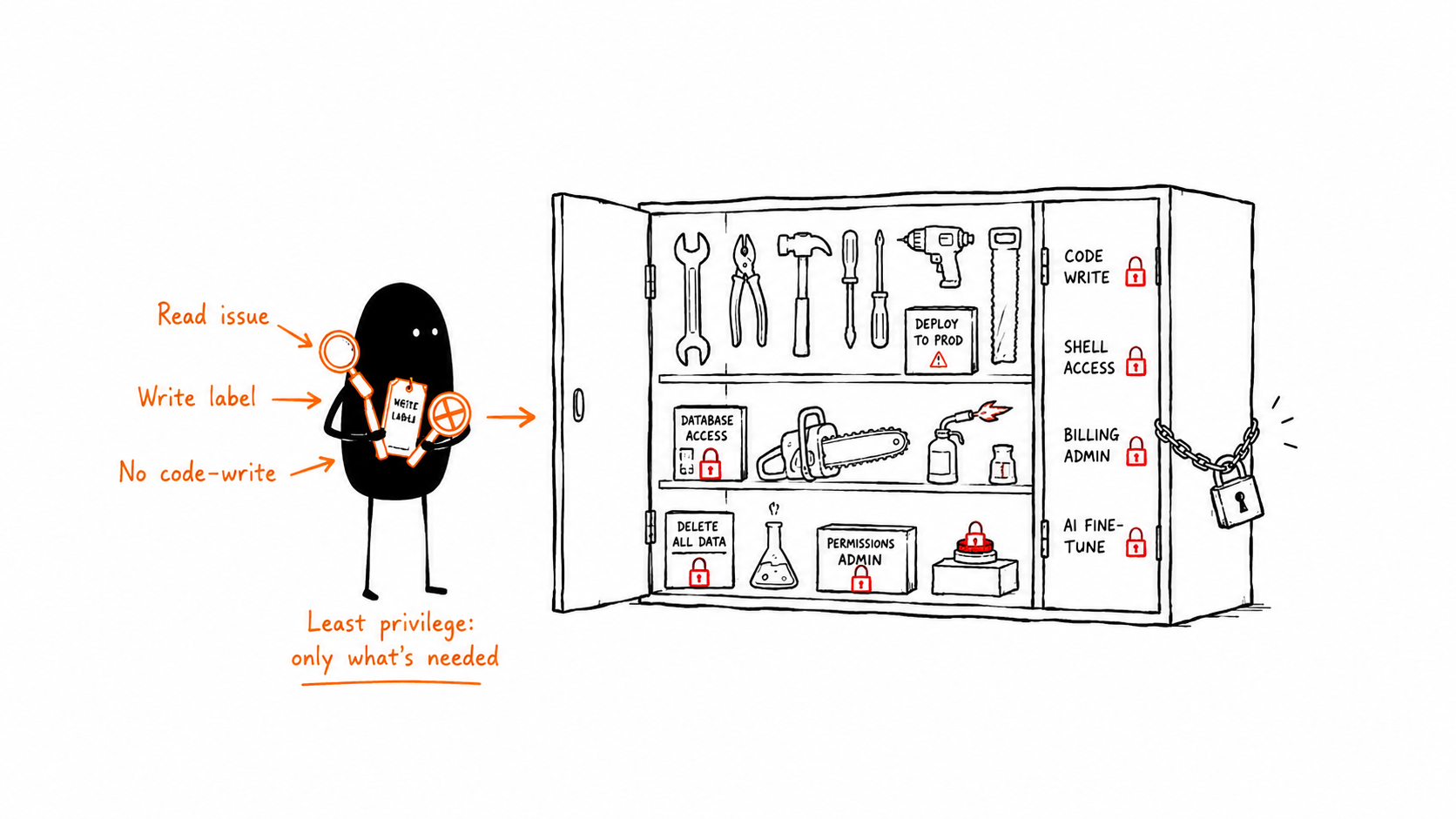
Start from the task, not the catalog. Identify the required tools — the minimum capability set to accomplish the goal — then grant exactly those.
| Step | Question |
|---|---|
| Identify | What capabilities does this task actually need? (read issues? run tests? call an API?) |
| Configure | Wire each tool to the agent (built-in or via MCP) |
| Permission | Scope each tool: read vs. write, which repos, which resources |
Tool permissions are least-privilege in action. A triage agent that only reads issues and writes labels does not need write access to code. The exam consistently rewards “grant the minimum,” and consistently punishes “give broad access for convenience.”
Scenario. A documentation agent needs to read the codebase and open doc PRs. Correct toolset: read repo, write to a docs branch, open PR. It does not need: production API tokens, secret access, or merge rights. If an answer option hands it more than the task needs, it’s the wrong (insecure) option.
MCP servers in depth
MCP is how non-built-in tools reach the agent. Four configuration skills, each a likely question:
| Skill | What it means | The point |
|---|---|---|
| Add an MCP server as a tool | Register a server so the agent can call its tools | This is how you extend capability |
| Configure a GitHub remote MCP server | Use GitHub’s hosted MCP endpoint vs. a local server | Hosted = no local process to manage |
| Configure MCP registries | Curate which servers an org/repo may use | Central governance of the tool surface |
| Configure MCP allow lists | Restrict which servers/tools an agent may use | Least-privilege for tools |
Remote vs. local MCP. A remote (hosted) MCP server is reachable without running a process in the agent’s environment — useful for the cloud coding agent. A local server runs alongside the agent. The exam may ask which suits a hosted/ephemeral agent: lean remote when the agent has no persistent local host.
Registries vs. allow lists. Registry = the menu of servers available in the org. Allow list = which items off that menu this agent may actually use. Both narrow the surface; they operate at different levels. An org curates a registry; a repo/agent applies an allow list.
Scenario — the over-broad MCP trap. An agent is given an MCP server that exposes shell, filesystem, and network tools, to accomplish a task that only needs to read a Jira ticket. The secure design restricts the allow list to the ticket-read tool, or uses a narrower server. Power you don’t need is blast radius you can’t justify.
Integrating agents into dev environments
This cluster is about where and how tightly the agent runs:
- Evaluate the execution context — what environment is the agent in, what can it reach, what are the constraints? Decide before you let it act.
- Scope to a specific repository — confine the agent to one repo.
- Use branch-based scope — confine changes to a branch; never let it touch protected branches directly.
- Invoke in a CI workflow — run the agent as part of CI (e.g. an Actions workflow) so it operates inside your pipeline’s controls.
- Enable autonomous actions — let it create branches and open PRs on its own, within scope.
- Handle environment-specific constraints — runtimes, dependencies, timeouts; this is where
copilot-setup-steps.ymlearns its keep.
Scenario — CI-invoked agent. On every PR, an agent reviews the diff for missing tests and comments. It is invoked inside a CI workflow, scoped to that repo, with read on the diff and write on PR comments only. It runs in the pipeline’s permission boundary — not with a human’s broad token. That containment is the design the exam rewards.
Safe execution and error handling
Agents fail. Domain 2 tests whether you engineer for failure. Memorize these five and what each is for:
| Mechanism | Purpose | Example |
|---|---|---|
| Error handling | Catch and respond to failures gracefully | Tool call fails → don’t crash the run; record and decide |
| Retries | Recover from transient failures | Network blip calling an MCP tool → retry with backoff |
| Rollbacks | Undo partial/bad changes | Revert the agent’s branch/commits when a step fails midway |
| Escalation paths | Hand off when the agent can’t safely proceed | Low confidence or repeated failure → flag a human |
| Traceability & accountability | Record who/what did what | Logs, commits, PR trail tying every action to the agent |
Retry vs. escalate — a classic exam fork. Retry a transient failure (timeout, rate limit). Escalate a persistent or ambiguous failure (auth denied, conflicting requirements, repeated identical error). Retrying a permission error forever is a wrong answer; escalating a one-off network blip is wasteful. Match the response to the failure type.
Scenario — rollback + escalation together. An agent’s multi-step change passes step 1, fails step 2. Safe path: roll back step 1’s commits (don’t leave the branch half-mutated), record the failure with full trace, and escalate to a human with the context. Clean state + audit trail + human hand-off.
Putting Domain 2 together
A well-architected agent task: minimum tools, each permission-scoped; external capability via allow-listed MCP servers (remote when hosted); scoped to a repo and branch; invoked inside CI; bootstrapped for its environment; and wrapped in error handling, type-matched retries, rollbacks, escalation, and a full trace. That sentence is half of Domain 2’s points.
Exam-style check
Q1. A triage agent needs to label issues. What tool permissions?
A. Read issues + write labels. Not code write or merge rights. Least privilege to the task.
Q2. An agent calling an MCP tool fails once with a network timeout. Correct response?
A. Retry with backoff — it’s a transient failure. Reserve escalation for persistent/ambiguous failures.
Q3. You want to centrally control which MCP servers any agent in the org can use, then further limit a specific agent to two of them. Which controls?
A. An org MCP registry for the available set, plus an allow list to limit the specific agent. Different levels, both narrowing the surface.
Q4. An agent should review every pull request automatically. How do you run it safely?
A. Invoke it inside a CI workflow, scoped to the repo, with read on the diff and write only on PR comments — inside the pipeline’s permission boundary.
Q5. An agent’s step 2 fails after step 1 changed files. Safest handling?
A. Roll back step 1, record the trace, and escalate to a human. Don’t leave a half-applied change; preserve accountability.
What to memorize
- This is the heaviest domain — know it cold.
- Identify required tools, then permission-scope each. Least privilege wins.
- MCP: add servers as tools; remote for hosted agents; registries (org menu) + allow lists (per-agent subset) for governance.
- Run agents scoped to repo + branch, invoked in CI, bootstrapped via setup steps.
- Engineer failure: error handling, retries (transient), rollbacks, escalation (persistent), traceability.
Next: Domain 3 — memory, state, and execution.