
The Anatomy of a Production LLM Call
Beyond the Quickstart: Authentication, Error Handling, and Cost Management
At 2 AM on a Tuesday, an LLM-powered chatbot for a fictional support platform quietly started returning gibberish. No one deployed a new release, the logs showed almost nothing, and the only clear metric was a sudden spike in spend: roughly $4,800 in six hours, most of it wasted on retries and confused users.
This post is about how to build the kind of production LLM call that would have turned that mess into one noisy but contained incident instead of an expensive fire drill.
83% of AI projects never make it past their first month in production, not because the models are bad, but because the surrounding plumbing is fragile: authentication is ad-hoc, errors are handled “later,” and no one really knows where the money is going. Most quickstarts help you say “Hello, world” to an LLM; this post is about building a call that can survive real traffic, real outages, and real bills.
Demos prove possibility; production proves responsibility.
What “Production-Ready” Really Means
In production, calling an LLM looks less like a chat window and more like a distributed system.
In a notebook demo, a production LLM call looks deceptively simple: a single client.chat.completions.create(...) and a print statement. In a real system, that same call sits inside a bigger frame: authentication, timeouts, retries, logging, metrics, and cost tracking.
Think of an LLM call as a pipeline, not a function.
A production-ready LLM call usually needs:
- Strong authentication practices: isolated keys, rotation, and zero secrets in source control
- A predictable request/response shape that hides provider quirks behind one internal interface
- Error handling that can distinguish transient issues from hard failures and cost runaway
- Token and cost tracking wired into your observability stack
- Rate limiting and backpressure, so you do not DOS your own wallet or get blocked by the provider
The rest of this post unpacks each of these layers with Python code and a reusable wrapper you can drop into your own stack.
Setting Up Python Clients (OpenAI, Anthropic, Google)
Each major provider now ships a reasonably ergonomic Python SDK, but the ergonomics hide important differences in defaults, timeouts, and streaming support.
Minimal client setup
# openai_client.py
from openai import OpenAI
import os

OPENAI_API_KEY = os.environ["OPENAI_API_KEY"]

openai_client = OpenAI(
    api_key=OPENAI_API_KEY,
)
# anthropic_client.py
import anthropic
import os

ANTHROPIC_API_KEY = os.environ["ANTHROPIC_API_KEY"]

anthropic_client = anthropic.Anthropic(
    api_key=ANTHROPIC_API_KEY,
)
# google_client.py
from google import genai
import os

GEMINI_API_KEY = os.environ["GEMINI_API_KEY"]

gemini_client = genai.Client(
    api_key=GEMINI_API_KEY,
)
These clients are intentionally kept thin; the goal is to do almost everything else (timeouts, logging, retries) in one shared wrapper rather than scattering it across three different SDK idioms.
Authentication Patterns and Security
Production systems tend to fail in surprisingly boring ways: someone hard-codes a key in a test script, that script gets committed, and bots scrape the repo. Once an LLM key leaks, it can be abused silently until your next billing email arrives.
A few durable patterns:
- Use environment variables or your secret manager of choice (Vault, AWS Secrets Manager, GCP Secret Manager)
- Never log raw API keys; log short hashes if you need to differentiate keys
- Rotate keys on a schedule and when suspicious spikes appear in your usage traces
Example: centralized config and key management.
# config.py
from pydantic import BaseSettings, SecretStr

class Settings(BaseSettings):
    openai_api_key: SecretStr
    anthropic_api_key: SecretStr
    gemini_api_key: SecretStr
    llm_default_timeout_seconds: int = 20

    class Config:
        env_file = ".env"
        env_file_encoding = "utf-8"

settings = Settings()
# usage in client
from openai import OpenAI
from .config import settings

openai_client = OpenAI(
    api_key=settings.openai_api_key.get_secret_value(),
    timeout=settings.llm_default_timeout_seconds,
)
This pattern keeps secrets out of your codebase and centralizes knobs like timeouts so you can tune them without hunting through multiple files.
Deep Dive: Request and Response Shape
Despite different branding, most chat-style LLM APIs share a similar conceptual request:
- A model name
- A sequence of messages or text
- Optional system-level instructions
- Optional tools or function definitions
- A choice between streaming or single-shot responses
The responses carry:
- A list of candidate outputs
- Usage metadata: prompt tokens, completion tokens, and sometimes cost
- Finish reasons like
stop,length, ortool_calls
A unified request object
# schemas.py
from typing import Literal, List, Dict, Any, Optional
from pydantic import BaseModel

Role = Literal["system", "user", "assistant"]

class LLMMessage(BaseModel):
    role: Role
    content: str

class LLMRequest(BaseModel):
    provider: Literal["openai", "anthropic", "gemini"]
    model: str
    messages: List[LLMMessage]
    max_tokens: int = 512
    temperature: float = 0.2
    stream: bool = False
    metadata: Dict[str, Any] = {}
Wrapping provider details behind LLMRequest lets you swap models without rewriting every call site.
Streaming vs Batch Responses
Streaming feels magical in a demo, but it needs explicit design decisions in production. A streaming response can reduce perceived latency and make interfaces feel much more responsive, but it complicates error handling, logging, and cost tracking.
Use streaming when:
- Users benefit from incremental tokens (chatbots, assistants, ideation tools)
- You want early partial results while long reasoning completes
Prefer non-streaming when:
- You run batch workloads
- You need to validate or transform the entire response before sending it anywhere
Streaming with OpenAI
# streaming_example.py
from .clients import openai_client
from .schemas import LLMMessage

def stream_answer(prompt: str):
    response = openai_client.chat.completions.create(
        model="gpt-4o-mini",
        messages=[{"role": "user", "content": prompt}],
        stream=True,
    )

    for chunk in response:
        delta = chunk.choices[0].delta.content or ""
        yield delta
This pattern pushes tokens out as they arrive while keeping your application logic in control of the iteration.
Error Handling and Retry Logic
Most production failures are not “the system is down”; they are “the system sort of works, but badly.” LLM calls add several more failure modes on top of classic HTTP errors: hallucinations, long tail prompts, and unexpected formats.
A simple but robust taxonomy:
- Hard failures: timeouts, 5xx responses, auth errors
- Soft failures: structurally valid responses that are wrong or low quality
- Degraded performance: very slow responses or partial timeouts
For hard failures, exponential backoff with jitter is the usual default; for soft failures, you need evaluation and guardrails rather than automatic retries.
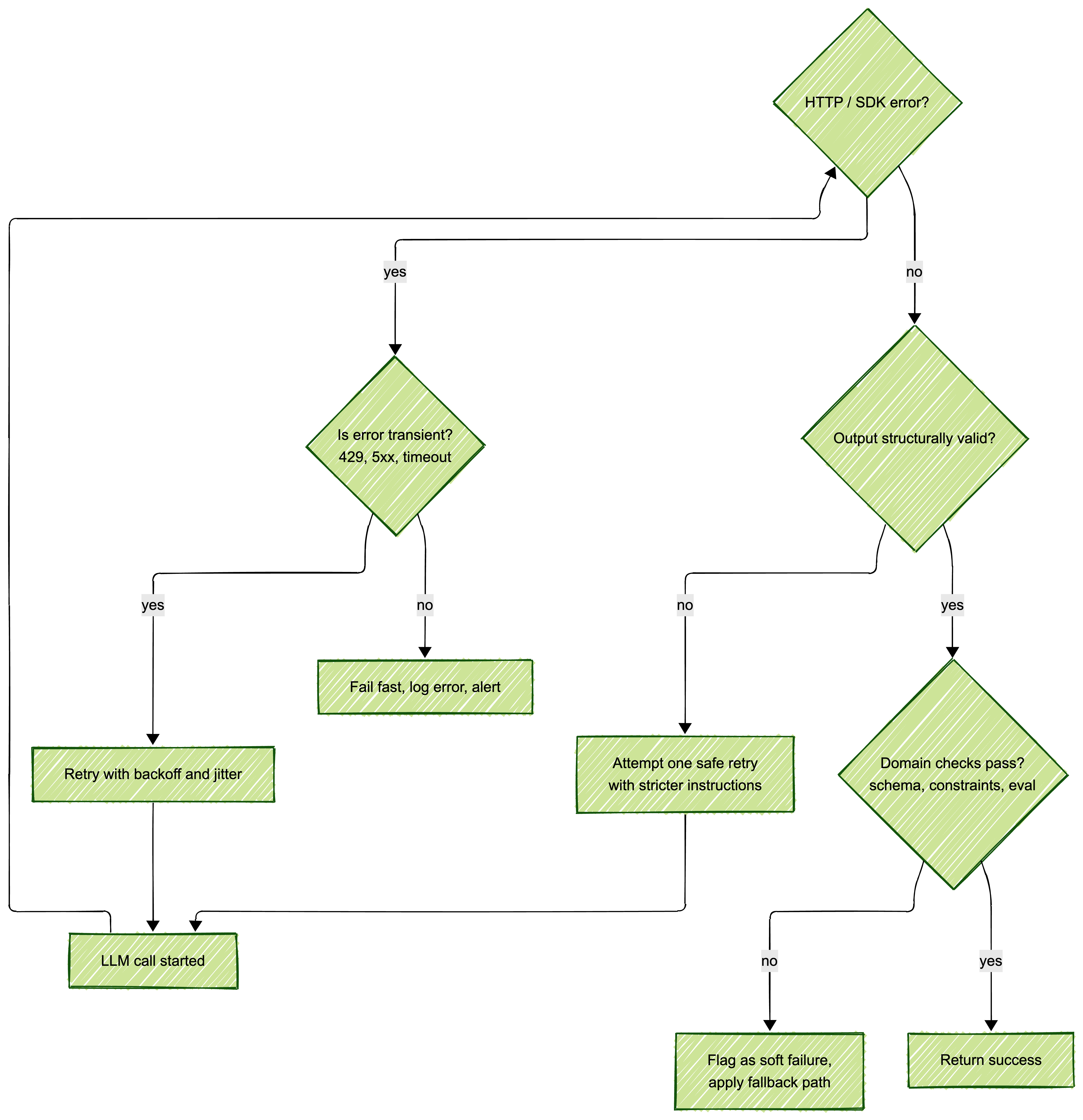
This tree separates “try again” problems from “stop now” problems, which is essential for cost control under load.
Python wrapper with retries
# llm_wrapper.py
import time
import logging
from typing import Optional
from .clients import openai_client, anthropic_client, gemini_client
from .schemas import LLMRequest

logger = logging.getLogger(__name__)

TRANSIENT_STATUS_CODES = {408, 429, 500, 502, 503, 504}

class LLMError(Exception):
    pass

def _is_transient_error(exc) -> bool:
    # Very simple heuristic, adjust per provider/SDK
    msg = str(exc).lower()
    return any(code in msg for code in ["429", "timeout", "unavailable"])

def call_llm(
    req: LLMRequest,
    max_retries: int = 3,
    base_backoff: float = 0.5,
) -> str:
    attempt = 0
    while True:
        try:
            if req.provider == "openai":
                resp = openai_client.chat.completions.create(
                    model=req.model,
                    messages=[m.dict() for m in req.messages],
                    max_tokens=req.max_tokens,
                    temperature=req.temperature,
                )
                content = resp.choices[0].message.content
                return content

            elif req.provider == "anthropic":
                resp = anthropic_client.messages.create(
                    model=req.model,
                    max_tokens=req.max_tokens,
                    temperature=req.temperature,
                    messages=[m.dict() for m in req.messages],
                )
                return resp.content[0].text

            elif req.provider == "gemini":
                model = gemini_client.models.generate_content
                resp = model(
                    model=req.model,
                    contents=[m.content for m in req.messages],
                    generation_config={
                        "max_output_tokens": req.max_tokens,
                        "temperature": req.temperature,
                    },
                )
                return resp.text
            else:
                raise ValueError(f"Unknown provider: {req.provider}")

        except Exception as exc:
            attempt += 1
            transient = _is_transient_error(exc)
            logger.warning(
                "LLM call failed",
                extra={
                    "provider": req.provider,
                    "model": req.model,
                    "attempt": attempt,
                    "transient": transient,
                },
            )

            if not transient or attempt > max_retries:
                raise LLMError(f"LLM call failed after {attempt} attempts") from exc

            backoff = base_backoff * (2 ** (attempt - 1))
            time.sleep(backoff)
This wrapper is intentionally minimal but shows the basic pattern: explicit attempts, transient detection, and structured logging.
If you can’t observe it, you can’t trust it.
Token Counting and Cost Tracking
LLM calls feel cheap per request, but costs accumulate quickly with retries, long prompts, and unbounded context. The teams that catch cost issues early treat token usage like performance metrics: always measured, always visible.
Typical instrumentation for each call:
- Prompt tokens, completion tokens, total tokens
- Model name and provider
- Per-request cost, derived from your current pricing matrix
- A link between LLM events and user actions or jobs
Simple cost calculator
You can keep a static dictionary of prices updated from vendor pricing pages or from your billing system.
# pricing.py
from dataclasses import dataclass

@dataclass
class ModelPricing:
    prompt_per_million: float
    completion_per_million: float

PRICING = {
    ("openai", "gpt-4o-mini"): ModelPricing(
        prompt_per_million=0.15,
        completion_per_million=0.60,
    ),
    ("anthropic", "claude-3-5-haiku-20241022"): ModelPricing(
        prompt_per_million=0.25,
        completion_per_million=1.25,
    ),
    # add more models as needed
}

def estimate_cost(
    provider: str,
    model: str,
    prompt_tokens: int,
    completion_tokens: int,
) -> float:
    key = (provider, model)
    if key not in PRICING:
        return 0.0
    p = PRICING[key]
    pt_cost = (prompt_tokens / 1_000_000) * p.prompt_per_million
    ct_cost = (completion_tokens / 1_000_000) * p.completion_per_million
    return round(pt_cost + ct_cost, 6)
With this helper you can attach per-request cost to traces and dashboards alongside latency and error rates.
Instrumenting usage
If your provider returns usage fields:
usage = resp.usage  # pseudo code: prompt_tokens, completion_tokens
cost = estimate_cost(
    provider=req.provider,
    model=req.model,
    prompt_tokens=usage.prompt_tokens,
    completion_tokens=usage.completion_tokens,
)

logger.info(
    "llm_call_completed",
    extra={
        "provider": req.provider,
        "model": req.model,
        "prompt_tokens": usage.prompt_tokens,
        "completion_tokens": usage.completion_tokens,
        "total_tokens": usage.total_tokens,
        "cost_usd": cost,
        "metadata": req.metadata,
    },
)
This structure makes it trivial to build “cost per feature” and “cost per user” views later in Tinybird, Langfuse, or your own telemetry stack.
Every token is a decision, both technical and financial.
Rate Limiting Strategies
LLM APIs are aggressively rate limited: too many calls in a short period and you will hit 429 responses, followed by retries, followed by higher costs. Simple “sleep a bit and try again” logic works in prototypes, but shared backends need a consistent strategy that protects both users and wallets.
Common approaches:
- Client-side token bucket per API key and per model
- Central concurrency limits per workload (for example, max 50 concurrent calls per environment)
- Queueing and backpressure for bursty jobs (background workers with explicit throughput caps)
Minimal in-process rate limiter
# rate_limiter.py
import time
import threading

class TokenBucket:
    def __init__(self, rate_per_sec: float, capacity: int):
        self.rate = rate_per_sec
        self.capacity = capacity
        self.tokens = capacity
        self.updated_at = time.monotonic()
        self.lock = threading.Lock()

    def consume(self, tokens: int = 1) -> None:
        with self.lock:
            now = time.monotonic()
            elapsed = now - self.updated_at
            self.tokens = min(
                self.capacity,
                self.tokens + elapsed * self.rate,
            )
            self.updated_at = now

            if self.tokens < tokens:
                # wait for enough tokens
                needed = tokens - self.tokens
                wait_time = needed / self.rate
                time.sleep(wait_time)
                self.tokens = 0
            else:
                self.tokens -= tokens
You can wrap call_llm to call bucket.consume() before each request and tune rate_per_sec per provider key.
A Production-Ready LLM Wrapper Class
Bringing everything together, here is a simplified wrapper class that you can grow into a full client library.
# production_llm_client.py
import logging
from typing import Optional
from .schemas import LLMRequest
from .llm_wrapper import call_llm, LLMError
from .pricing import estimate_cost
from .rate_limiter import TokenBucket

logger = logging.getLogger(__name__)

class ProductionLLMClient:
    def __init__(
        self,
        provider: str,
        model: str,
        rate_per_sec: float = 5.0,
        capacity: int = 10,
    ):
        self.provider = provider
        self.model = model
        self.bucket = TokenBucket(rate_per_sec, capacity)

    def generate(
        self,
        messages,
        max_tokens: int = 512,
        temperature: float = 0.2,
        metadata: Optional[dict] = None,
    ) -> str:
        metadata = metadata or {}
        req = LLMRequest(
            provider=self.provider,
            model=self.model,
            messages=messages,
            max_tokens=max_tokens,
            temperature=temperature,
            metadata=metadata,
        )

        self.bucket.consume()

        try:
            content = call_llm(req)
            # usage / cost would be attached here if the underlying call exposes it
            logger.info(
                "llm_success",
                extra={
                    "provider": self.provider,
                    "model": self.model,
                    "metadata": metadata,
                },
            )
            return content
        except LLMError as exc:
            logger.error(
                "llm_failure",
                extra={
                    "provider": self.provider,
                    "model": self.model,
                    "metadata": metadata,
                },
            )
            raise
This client gives you one stable entry point per provider and model; everything else is configuration and observability.
Visual Flow: Request → Error → Retry → Success
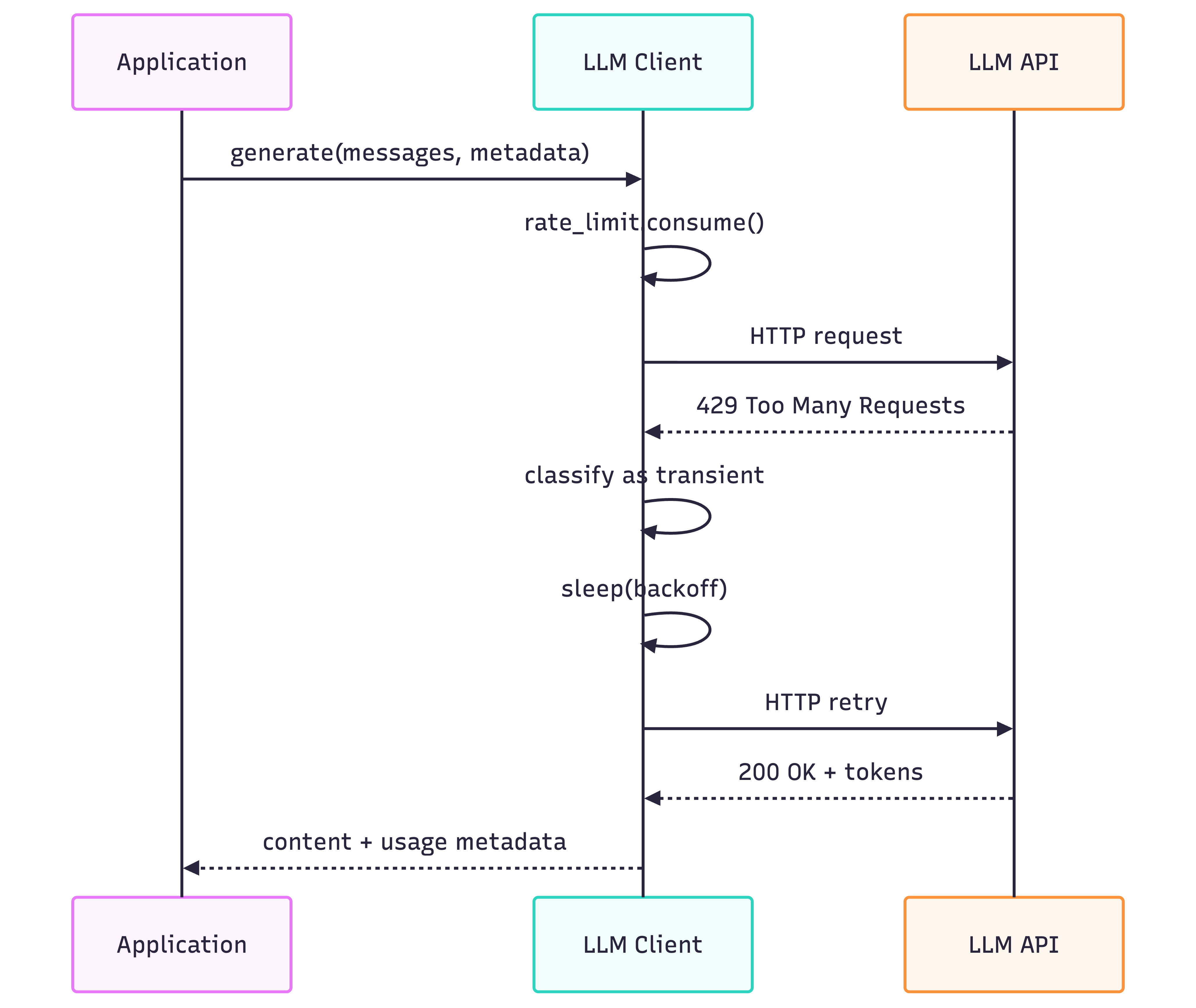
This sequence diagram mirrors what your logs should show during high load: clear distinctions between first attempts, retries, and final success.
Tiny Cost Calculator Tool (CLI)
As a final practical tool, here is a tiny CLI script you can run locally to estimate costs for different token budgets.
# cost_cli.py
import argparse
from pricing import estimate_cost

def main():
    parser = argparse.ArgumentParser()
    parser.add_argument("--provider", required=True)
    parser.add_argument("--model", required=True)
    parser.add_argument("--prompt_tokens", type=int, required=True)
    parser.add_argument("--completion_tokens", type=int, required=True)
    args = parser.parse_args()

    cost = estimate_cost(
        provider=args.provider,
        model=args.model,
        prompt_tokens=args.prompt_tokens,
        completion_tokens=args.completion_tokens,
    )
    print(f"Estimated cost: ${cost:.6f} per call")

if __name__ == "__main__":
    main()
This is not meant to replace proper monitoring, but it makes planning and discussions with stakeholders concrete when talking about “what happens if we scale to a million calls per day.”
If this post was about the plumbing around a single LLM call, the next post in this series will focus on the other half of reliability: prompts themselves. That post dives into real prompt engineering in production, including templates, formats like JSON and XML, and how to test prompts the way you test code.
Key Takeaways
-
Authentication matters - Leaked keys cost money. Use secret managers and never commit keys.
-
Error handling is not optional - Distinguish transient failures from hard failures. Retry the right things.
-
Track costs from day one - Token usage scales with traffic. Instrument everything.
-
Rate limiting protects your wallet - Too many requests means 429s and wasted retries.
-
Unified interfaces reduce complexity - One wrapper for all providers beats three different SDK patterns.
What’s Next
Internal links:
- Prompt Engineering: The Difference Between Demos and Production - Next in the Foundations series
- Context Window vs Attention Window - Managing context windows effectively
Views expressed are my own and do not represent my employer. External links open in a new tab and are not my responsibility.
What challenges have you faced building production LLM integrations? I’d love to hear about your experiences. Connect with me on LinkedIn or reach out directly.

Discussion
Have thoughts or questions? Join the discussion on GitHub. View all discussions